

Cable Matters 20Gbps USB C Switch for 2 Computers, Supports Up to 8K@30Hz on Windows, 4K@60Hz on macOS, 140W PD, for Sharing a USB-C/Thunderbolt 4 Monitor or Dock (Not Work with Captive Cable Docks)
$5.99
Related Products
![[2-Pack] USB C Wall Charger,50W 5-Port PD Fast USB C Charging Block,2USB C+3USB A Multiport Plug,Type C Power Adapter Brick Cube for iPhone 17/16/15/14/13/12/Pro Max/XS,iPad,for Switch,Samsung,Ultra 2](https://simplytechco.com/wp-content/uploads/2025/11/71wfX0AdoL._AC_SL1500_.jpg)


![Reborn HDMI to USB C Cable Adapter [10FT 4K@60Hz], Uni-Directional HDMI (Source) to USB-C (Monitor) with USB Power for AR Glasses XREAL One、Air 2 Pro/VITURE Pro/RayNeo Air 2s,PS5,Portable Monitors](https://simplytechco.com/wp-content/uploads/2025/11/61Lajv4JMpL._AC_SL1500_.jpg)



Product description
The video showcases the product in use.The video guides you through product setup.The video compares multiple products.The video shows the product being unpacked. Cable Matters 20Gbps USB4 Switch for 2 Computers Merchant Video


1 For USB-C Monitors
2 For USB-C Docking Station


1 Direct Connection
2 Dock Setup
3 Limits with MacOS
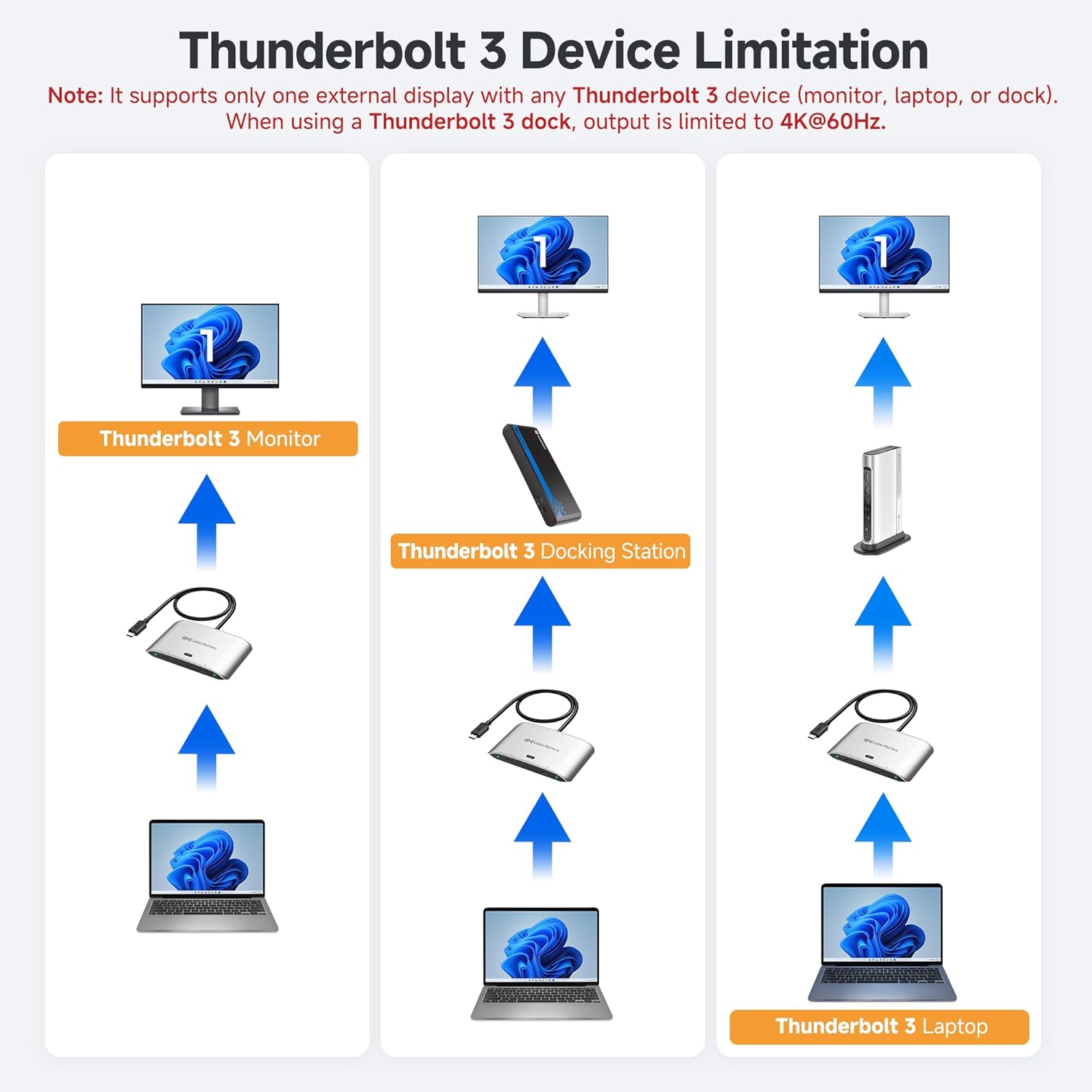
4 Limits with Thunderbolt 3
Supported Monitor Models: (This is not a complete list)*
Acer Nitro XV275K P3biipruzx, Nitro XV282K KVbmiipruzx, SH272U Ebmiphux ASUS ProArt PA278CV, ProArt PA279CRV, ProArt PA34VC BenQ PD3220U, PD3225U, PD3420Q, SW271C PhotoVue Dell S2722QC, UltraSharp U2720Q, UltraSharp U2723QE, UltraSharp U3224KB, UltraSharp U3425WE, UltraSharp U4025QW HP E27m G4 QHD USB-C Conferencing Monitor, Z32k G3 4K USB-C Monitor, Z43 42.5-inch 4K UHD Display Lenovo ThinkVision P27h-20, ThinkVision P34w-20, ThinkVision T32p-20 LG 27UN850-W, 32UN880-B Samsung CJ791, S60UA, S80UA, ViewFinity S80PB *Important When connecting the USB-C switch to a Thunderbolt 3 dock, it will support only ONE display with a max resolution of 4K@60Hz. Note#1 Do not use a USB-C coupler to connect the Switch to a USB-C hub or dock with a built-in pigtail cable. Note#2 Do not use Thunderbolt 3/4/5 cables for connection. Only use the included USB4 cables to avoid compatibility issues. Note#3 The switch is designed to connect to a single monitor with a USB-C input. For multi-monitor setups or monitors with DisplayPort / HDMI inputs, a USB-C docking station is required. Note#4 The remote control is pre-paired with the switch. To pair a new remote, connect the switch to the computer, then press and hold the Pair button for 5s until the LED stops flashing.


1 Two Switching Methods
2 Packing List
Can I use my own Thunderbolt 3/4/5 cables instead of the included USB4 cables?
No. Use only the included USB4 20Gbps cables. Thunderbolt or higher-speed USB4 cables are not supported. For longer cables, search ASIN B0CCF99VZ9 or B0C9P3RVTH.
Can this switch support dual monitors?
The switch itself supports one USB-C monitor. Dual displays require a USB-C or Thunderbolt 4/5 dock (Windows only). macOS and TB3 docks support one display only.
Can I use a USB-C coupler to connect this switch to a dock with a built-in cable?
No. Please connect the switch directly to the dock’s USB-C port. USB-C Couplers and docks with integrated cables can cause compatibility issues.
My wireless keyboard/mouse lags or disconnects—how can I fix this?
USB 3.0 can interfere with 2.4GHz signals. Use a USB extension to move the receiver away, or use a USB 2.0 port if available.
What is the maximum number of extended displays supported on macOS?
One. macOS does not support MST, so only one extended display is supported, even with a docking station.
Comparison Products
Add to Cart
Add to Cart
Add to Cart
Add to Cart
Add to Cart
Customer Reviews
3.9 out of 5 stars 497
4.2 out of 5 stars 69
3.9 out of 5 stars 304
4.0 out of 5 stars 54
4.6 out of 5 stars 308
Price
$59.99$59.99
$44.99$44.99
$79.99$79.99
$199.99$199.99
$19.99$19.99
Hosts Support
2
2
2
2
—
Video Ports
USB-C
N/A
DisplayPort
HDMI + DisplayPort
USB-C
Video Output Ports
8K@30Hz or 4K@144Hz
N/A
8K@60Hz / 4K@120Hz
8K@30Hz or Dual 4K@60Hz
8K@30Hz or 4K@120Hz
USB Ports
2x USB-C
2x USB-C/2x USB-A
3x USB-A
6x USB-A, 1x USB-C
—
PD Charging
140W
N/A
No Charging
100W or Dual 65W
240W
Model Number
201352
201160
202070
201075
201323
Compatibility Warning: Use only the included USB4 20Gbps cables. Do not substitute with Thunderbolt 3/4/5 cables. The switch works with USB4 and Thunderbolt 4 docks, but its 20 Gbps bandwidth (vs. 40 Gbps for most docks) may limit the number of displays or the maximum resolution/refresh rate compared to your original setup. Avoid USB-C docks with built-in pigtail cables to prevent compatibility issues.
Ultra-Fast 20 Gbps USB4 /USB-C Switcher for 2 Computers: Instantly share a USB-C monitor or Thunderbolt 4 Monitor or a Thunderbolt docking station between two laptops with this versatile USB C KVM switch. Connect the pigtail cable to your monitor or docking station and the included 3.3ft USB-C/USB4 cables to two computers for seamless device sharing. Achieve lightning-fast data transfer speeds up to 20 Gbps, perfect for large file transfers, high-resolution video streaming, and demanding applications.
8K Video Resolution Support: Experience stunning 8K video output at 30Hz, delivering exceptional clarity and color accuracy for both professional and entertainment use. Supports up to 8K@30Hz / 4K@144Hz on Windows, and 4K@60Hz on macOS when connected to a single USB-C or Thunderbolt 4 monitor. Compatible with popular models including Dell UltraSharp U3224KB, U3425WE, U2723QE, U4025QW, U2720Q, Dell S2722QC, HP E27m G4 QHD USB-C Monitor, HP Z43 42.5-inch 4K UHD Display, HP Z32k G3 4K USB-C Monitor, Lenovo ThinkVision P27h-20, T32p-20, LG 27UN850-W, and LG 32UN880-B.
Docking Station Conversion: Share one USB-C or Thunderbolt 4 docking station between two computers and use it like a Thunderbolt KVM switch. For dual or multi-monitor on Windows, choose a USB-C/TB4 dock with MST (macOS supports one display). Compatible with popular TB4 docks with a detachable host cable: CalDigit TS4/Element Hub, Lenovo ThinkPad Universal TB4 (40B0), Plugable TBT4-UDZ/UDX1, OWC 11-Port TB4/Thunderbolt Go, Anker 777/778, Satechi TB4 Dock, Kensington SD5780T, Cable Matters TB4 Dock 107054, TB4 Dock Pro INC006 and more.
140W Power Delivery Pass-through Charging : Provides robust power delivery pass-through up to 140W, ensuring fast and efficient charging for your laptops, tablets, and other USB-C devices. With support for pass-through power delivery of up to 140W, this USBC switch not only transfers data at speeds up to USB4 20Gbps but also charges the selected (active) computer when connected to a USB-C / Thunderbolt monitor or a USB-C Power Delivery compatible docking station.
Convenient RF Remote Control: Functioning as a Thunderbolt 4 switch, it can seamlessly switch between two connected hosts using the included RF remote control, without the hassle of additional software or drivers. Maintain a clean and organized workspace by eliminating the need for extra cables and switches. This flexibility allows for optimal placement of the USB C switcher 2 computers, ensuring it fits perfectly within your workspace setup.
9 reviews for Cable Matters 20Gbps USB C Switch for 2 Computers, Supports Up to 8K@30Hz on Windows, 4K@60Hz on macOS, 140W PD, for Sharing a USB-C/Thunderbolt 4 Monitor or Dock (Not Work with Captive Cable Docks)
Add a review

$5.99
Ryan S. –
Works Perfectly for Dual-Computer USB-C Display Setups — Great Value
The Cable Matters 20Gbps USB-C Switch turned out to be exactly what I needed for my dual-computer setup. I use both a Mac and a Windows work laptop, each with USB-C display output. I’ve got my keyboard, mouse, and desk light all plugged into a USB hub on the back of my monitor, and I simply velcroed this switch to the back.When I want to swap between my Mac and work laptop, I just reach over and press the button — it switches over in about three seconds, which is totally fine for me. The remote control works too, but since I’m sitting right in front of the monitor, I rarely use it (it might be perfect for other setups though).I originally bought this on a whim just to test my idea, and it turned out absolutely perfect. For the price, it beats a lot of expensive KVM switches.The goodSeamless switching between Mac and Windows laptopsOnly a brief 3-second delay when switchingCompact and easy to mount behind the monitorWorks great with existing USB hubs and accessoriesExcellent value compared to full KVM switchesWould be nice if it came with a small combo USB-C/USB-A hub includedOverallIf you have two computers with USB-C display output, this is an awesome little device. Clean, affordable, and works exactly as expected.Perfect for dual-computer with usb-c display output productivity setups.
Ted Chmielewski –
Works with a single Dock for two computers
i have an HP work laptop and thunderbolt 5 Mac mini connected to an older (discontinued) thunderbolt 3 Mokin dock with Pebble usb speakers, mouse, keyboard, webcam, scanner and output to dual 2k monitors via displayport… and this switch works PERFECT. this is the WFH dream setup, and allows me to flip from laptop to the Mini for $60. the trade off is that i had to provide separate power to the laptop so that it keeps getting power from somewhere after i have switched away. I already had an Anker 240w charger for that.if you have a dock that works with two computers and you just need to change the ubc-c cord… this switch “should” work to make that dock switch to either computer with just a button push. then you just need to solve for constant power to each machine, because the power would switch too.i spent two months trying and returning 5 different KVM docks priced up to $500 and not a single one worked right, and this little beauty works for a fraction of that price!! im so impressed.piece of advice– i tried a different (longer) thunderbolt 4 cord from the switch to the Mini and it did not work… it was a Silkland cord, perhaps those cords are not up to spec? but the shorter cords that came with this switch do work, so i had to rearrange my setup to make the short cable matters cord work (not a deal breaker for a mac mini, which is small enough to be moved around)i cant say this enough– forget the KVM options out there. i spent probably 100 hours researching and never found one that worked for me, despite using chatGPT for tips and reading thousands of reviews from actual users and “Vine” reviews. KVM seems like such a simple idea… but they just dont work 100% for some reason. The mouse or keyboard drops out, flickering monitors, dropped handshake protocols… and issues came arise months after purchase. for that kind of money they need to work better.fortunately, this little switch did exactly what i need, for a dream price. Thank you Cable Matters!
Kim Congdon –
Not worth the money
Pretty crappy. The cables it came with didn’t work, although it does work with other cables (although the instructions explicitly say it won’t) and the remote died after 5 minutes. The device itself functions, and if you have your own cables and are willing to get up and manually switch it, it’s fine, but considering all that, not worth the money.
Steve Williams –
Works quite well as it is supposed to, within its boundaries.
I am using this switch to share my thunderbolt docking station between two laptops. And it has been doing the job quite well so far.I have been looking for this kind of switch for a very long time. This is 20gbps switch. I actually have been looking for 40gbps which I have not found yet anywhere. So reluctantly settled down on this one.Before you buy this, you need to understand some limitations and set your expectations.1) It will work only with standard length thunderbolt cables. Do not try to use longer cables or link two cables using couplers. It will simply not work. If you need longer distance, this is switch is not for you. DO NOT buy.2) At 20gbps bandwidth, it will not support too many 4K monitors. I am using 4 x 1080p monitors (1920×1200 resolution) and it works quite well. I have tested successfully with 2 x 4K monitors. But I do not think it will support more than two 4K monitors (I do not have 3rd 4K so I can’t test more than two 4K).If you can live these two limitations, this is a perfect product for you. I really really wish they come up with a 40gbps version.
ボボ –
I am currently using 1 external display for both Macbook Pro (M1 Pro) and Mac Mini (M2).Even though I can switch all devices such as monitor, hifi system keyboard and mouse by just connecting 1 thunderbolt cable, but it is still a hassle.However, it took me a long time to look for a KVM switch that can support faster than 10gbps as most of the KVM switch in the market only support up to 10gbps.Until one day I came across this CableMatter 20gbps switch, it solved all the problems that I had by manually unplugging and plugging in the thunderbolt cable to different devices and it has been work flawlessly for after a year of usage.
Antoine D. –
Après plusieurs essais infructueux de partage d’un écran Apple Studio Display entre un Mac et un portable Lenovo T14, ce switch fonctionne parfaitement. La télécommande est très pratique
Adrián –
RESUMEN: Funciona perfecto, ideal si quieres cambiar rápido entre dos portátiles. Funciona con vídeo y carga.Tengo un monitor que conectaba con un cable USB para cagar y tener video a la vez en mi portátil personal.Quería poder intercambiar fácil entre mi portátil y el del trabajo sin tener que cambiar el cable.Ahora tengo ambos portátiles conectados al aparato, y éste conectado al monitor, con un click en el botón físico (o los botones del mando) me cambio rápidamente de uno a otro.Tarda alrededor de unos 5 segundos cambiar de uno a otro, nada dramático ni para bien ni para mal.Creo que solamente carga el portátil activo, pero no he hecho pruebas para corroborarlo.
Anan Thonglam –
I currently have it setup with a Wavlink triple display dock (DisplayLink) with 2 1080p monitors connected to a Mac Mini and a Mac book pro. I can confirm this setup works for dual monitors.One important thing, make sure to use the included usb4 cables. I have tried to use a longer 2M 40gbps/240W usb c cable because the included ones are a little too short for my setup. This doesn’t work as I believe the cables quite different. If you do want to have a longer cable you’ll really need to do a bit more research and find a suitable 20Gbps USB4 cable possibly from the CableMatters brand themselves. I believe USB4 also has a length limit for passive cable and signal lost can occur which for me causes my monitors to flicker on and off. The included shorter cables does not cause this issue.
Andre –
The Cable Matters 20Gbps USB4 USB C Switch is the most reliable option I found after trying multiple USB-C switches.- Seamless switching between two MacBooks- Supports 4K monitor and multiple peripherals (keyboards, mouse, auth key)- Charging capability for the connected laptopCompact design (2 inches) for easy mounting- After a month of use, it has worked flawlessly every time they’ve switched between computers.