
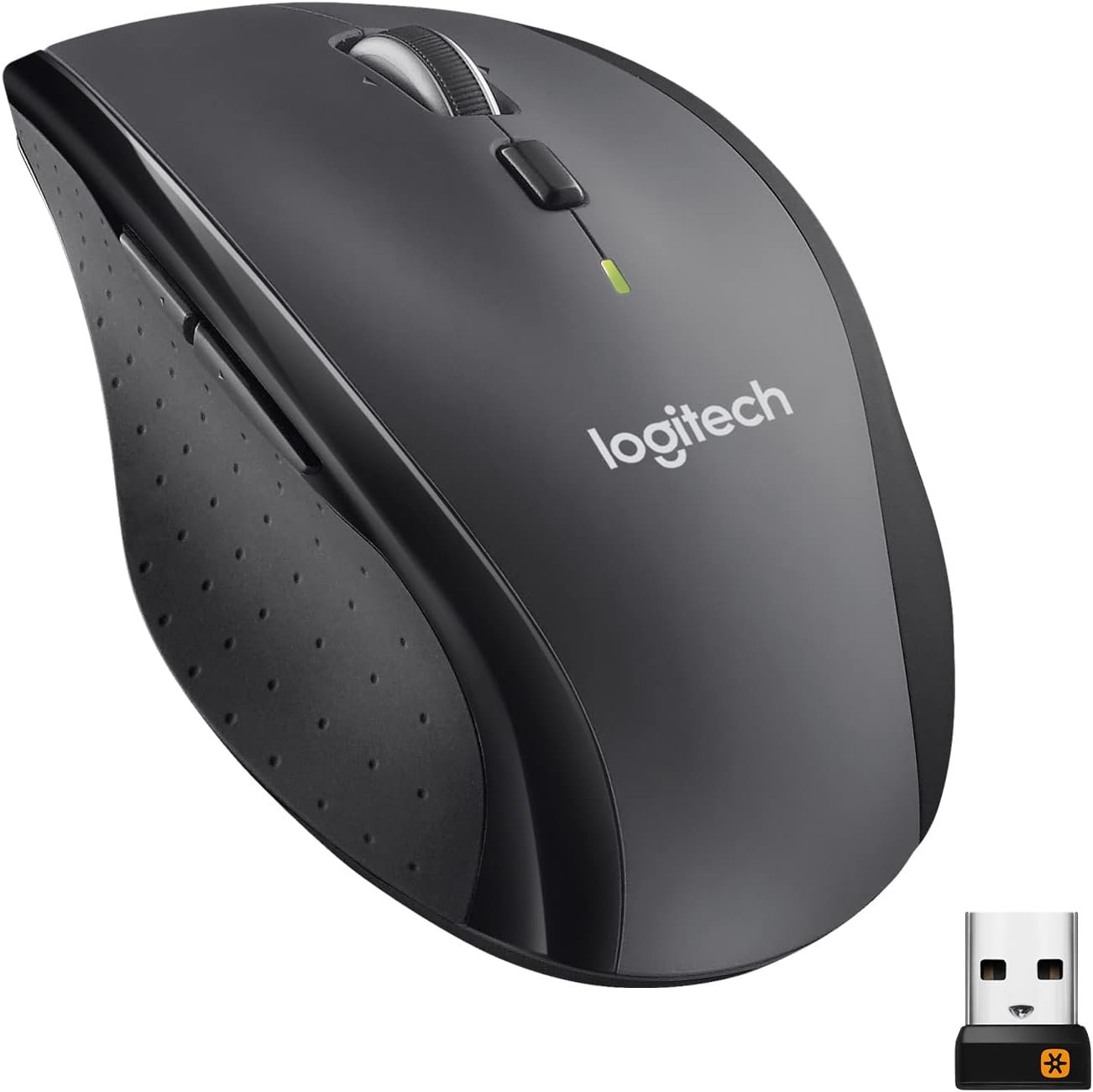
Logitech M705 Marathon Wireless Mouse, Gaming Mouse Wireless, 2.4 GHz USB-A Receiver, 5-Programmable Buttons, 3-Year Battery, PC, Mac, Laptop, Chromebook – Black
$5.99
Related Products




Logitech Wireless Mouse Marathon M705 lets you power on… and on. This black wireless mouse uses far less power than comparable wireless mice, so you’ll go up to three full years between battery changes.* With its tiny wireless receiver, often referred to as a USB mouse wireless dongle, this PC mouse wireless solution remains plugged into your computer, ensuring your mouse is ready whenever needed. Suitable for those in need of a computer mouse wireless option, it offers hyper-fast scrolling to speed through documents. Enhanced with Advanced Optical Tracking, you’ll experience smooth, responsive cursor control across various tasks. The sculpted, right-hand shape provides comfort. Additionally, it functions well as a wireless mouse for gaming sessions or office tasks. Impressive as a wireless mouse for PC, a convenient cordless mouse, or a Bluetooth gaming mouse for leisurely activities, the M705 stands as a strong contender for varied needs.
Click more. Scroll more. Do more. Logitech Marathon Mouse M705, a Logitech mouse wireless, uses far less power than comparable mice. That means you can go up to three full years with this wireless mouse for laptop before battery changes.*
The tiny Logitech Unifying receiver stays in your laptop. There’s no need to unplug it when you move around, minimizing the risk of it being broken or lost. Easily add Logitech wireless mouse or keyboard to the same wireless receiver.
Laser grade tracking delivers smooth, responsive, precise cursor control on surfaces that cause problems for standard optical mice, such as polished or wood-grain tables. Compatible with wireless laptop mouse and wireless mouse logitech.
The sculpted, right-hand shape guides your hand to a naturally comfortable position and places customizable control within your reach. Two thumb buttons on the logitech gaming mouse let you move quickly between Web pages.
Hyper-fast scrolling lets you fly through long documents and Web pages with a single spin of a nearly frictionless metal scroll wheel, suitable for a wireless gaming mouse and a bluetooth mouse for laptop.
8 reviews for Logitech M705 Marathon Wireless Mouse, Gaming Mouse Wireless, 2.4 GHz USB-A Receiver, 5-Programmable Buttons, 3-Year Battery, PC, Mac, Laptop, Chromebook – Black
Add a review

$5.99
Joseph K. Naneville –
Comfortable Mouse & Smooth Operation
I bought this Logitech M705 to replace an aging one with a touchy left click button, which was part of a wireless desktop keyboard and mouse package (MK700) that was purchased over a decade ago. So, replacing the old M705 with a new M705 was a no-brainer.After receiving the new M705, I inserted the battery and expected the new mouse to connect to the old Logitech Unifying Receiver automatically. To my surprise, the mouse didn’t work, so I plugged in the new USB receiver and the mouse worked, but not the old keyboard. Perplexed, I started looking at Amazon reviews and thankfully I ran across a review from Rudy which helped solve my problem quickly. Turns out I needed to go to logiwebconnect.com to get the new mouse to work with the old unifying receiver. Once I did, I had the new mouse working in a matter of minutes.I saw a lot of negative reviews for the newer version of the M705, but the new mouse build quality is good, it’s as comfortable as the old M705, and it works flawlessly for me. The buttons are responsive, the scroll wheel has detents, and there are no issues with random scrolling with the scroll button engaged. I used to work as a PC technician, and my experience is in most cases when there are issues with peripheral devices it ends up being the PC itself, and rarely the peripheral device.Overall, this a great replacement for an aging mouse, wired or wireless, or if you are considering a new mouse. If the battery life matches the original M705, which I’m certain it will, expect to get many years of operation without replacing the batteries.
Jeff&I –
Everyone knows this is one of the absolute GOATS of Logitech Mice – get one before they’re gone…
I’ve had many Logitech mice over the years I’ve really loved that were then discontinued. This is a long running mouse that pretty much ALL logitech users just love! And since it’s long in the tooth, I’d recommend stocking up while you can. Here’s some of the perks, but above all else, it feels so amazing!1. It’s a smallish, very light, simple mouse. I personally don’t like the giant gaming mice. This has everything I need, including a scroll wheel you can click between smooth and ratcheted mode.2. Uses 1 or 2 AA batteries – This gives it incredible battery life – many months at least. And when you do need to replace batteries, it’s instant. I keep a pair in my backpack. So much more convenient than having to charge a rechargeable mouse, especially given rechargeable batteries slowly wear out.3. Works like a dream on Macs with no drivers installed at all!4. You can stash the wireless USB receiver dongle inside the mouse! Which is priceless.Note that nowadays, I have an Apple Silicon Mac, I have to use a tiny adapter to plug the dongle into a USB-C port. But it’s still tiny and convenient.5. For me, Logitech still hasn’t made anything better. I’d love to see a mouse almost like this with a USB-C receiver, but until then, it’s as close as it gets to my perfect mouse. I have tons of these all over the place.
John F –
One of the Best
I’ve tried other names brands over the years, but always come back to LogiTech.Logitech makes some of the best wireless mice. This recent purchase is my Third M705 mouse. The previous one lasted almost 10 years before it started acting a little quirky. It could have only needed a good cleaning, but for the price it is easier to get a new one.I also recently bought a new computer, because my 9 year old Win 7 HP physically broke at the screen hinge. The well-designed Logitech M705 mouse lasted longer than my last two computers. LOLI love the design and I’m so glad it hasn’t changed over the years. The mouse is very comfortable to hold and the buttons and wheel feel like a normal part of my hand. The mouse also has (programmable) side buttons, which are thumb operated for Forward and Back for use in a browser. They can also be easily programmed for reverse operation (whichever seems more natural for the user). Or, they can be programmed for custom commands in programs, besides the standard Forward/Back in Web Browsers.The description says the batteries last up to 3 years, and they literally do, with good quality (Duracell) AA batteries. The mouse also gives an on screen notification when the batteries finally get low.The mouse uses a very small USB dongle (Receiver) to communicate between the mouse and computer. There is no need to Pair devices via Bluetooth. Simply plug in the USB Receiver and start using the mouse. It’s truly Plug & Play.It’s fortunate that the receiver & mouse are Plug & Play, because the the printed instructions are all but useless. The are no visual diagrams. And the instructions are printed in multiple languages using micro-fine text that is almost illegible.It’s worth pointing out that the USB Receiver is hidden inside the battery compartment and is so small it is easily overlooked. It’s a good design to prevent losing the receiver when using multiple computers, or taking from home to school/work. But it confused me at first, because I expected it to be a separate item in box, which I thought was missing.Overall, I highly recommend this mouse. I’ve bought it before and I’ll buy it again.UPDATE: To MKay who is getting the 3 blank screens with images of multiple open programs. That is not a error with the Logitech mouse. On some versions of Logitech mice, there is a very small (almost unnoticeable) on the left side at the bottom. It is (by default setting) used to scroll through multiple open programs/windows when the taskbar is hidden. Microsoft Windows 11 (and probably earlier versions, too) has the feature of TaskView (a setting which can be turned off in Taskbar settings). The TaskView has a black & white icon on the Taskbar. It is a very annoying feature IMO! The small (programmable) button on the mouse is most likely activating the TaskView feature – which is exactly as the picture you provided. Don’t get mad at LogiTech for an MS Windows feature. Simply turn off TaskView in Taskbar settings, or reprogram the button on the mouse to do something else – and Love your mouse again!
bellyman69 –
I have been using this mouse model for ~12-15 years and have been pleased with the performance and warranty claim service.My hand is considered “large” (~7.9″ from middle finger to wrist line) and I love how this mouse feels in my grip. I am on the computer for most of my days – about 14-16hrs a day on average weekdays and close to that on weekends.The model has changed over the years – there used to be an additional thumb button but that is no more in the current iteration (less one button). Never used it anyways. IMO all the buttons are just another PITA to remember which does what.Once I picked up a slew at Costco for $19.97 (the infamous last call). But for years now I have purchased here on AMZN – always trying to nab a discount.Buttons & Wheel- I almost never use any buttons other than the left and right click; maybe the forward back on the thumb but it is not always instinctive to use that feature. I work on various PCs and not all have the same mouse – so I’d rather stay way from additional buttons. But for some the more the better.- For the wheel – for scrolling and left-right movement. Rarely if ever use the button (push down) feature – it is bit hard and cumbersome – not critical to me. I love the free wheel option but also the clicking to the next position. I haven’t found any el-cheapo mice that can replicate the free wheel & click feeling.- Once I get these, I modify the left-right scroll in VLC to help with fast jumping forward and back. Just perfect.- These are *NOT* gaming mice and you will prematurely ruin the buttons. You should have a second standby mouse available when you want to power up and play the original Halo CE PC version with more grenades than the XBOX VERSION and ability to keep/backup save games. I have the G700s – one day I may upgrade but so far it still works fine – when I do play Halo (LEGACY of course).Connection- No concerns (how many USB receivers do I have now?)- I used to have it directly below off the front of the PC but required a new device and move this to the back of the CPU – no concerns with lag or anything else- Dongle fits in bottom of mouse if you want to pack itBattery Life- Gorgeous- An absolute nifty feature I have only seen on Roku remotes – is the fact that the batteries both go in the same direction- In a pinch you can run the unit on one battery – talk about a major convenience- I use rechargeable without concern- AAA adds to the weight – but not a concern and lasts long anyways without bothering with them3 Year Warranty- I cannot stress IMO how important the 3yr warranty is. The absolute main failure will be the buttons releasing on you without you releasing them physically [aka PREMATURE CLICK-U-LATION]. That is the biggest peeve – too bad companies cannot design them so you can easily replace these (you know – to save the blasted planet since Mars isn’t an alternative – since there is no air to breathe). And this is where the 3yr comes into play- they don’t fail IMO in year 1 – but typically if they are to fail – in years 2½ – 3.- Yes there is the shiny new M720 that seems to be well reviewed and lots of positives – except – it like many mice comes with a paltry 1yr. When read reviews here and elsewhere and saw the 1yr on Logitech’s site, I said to myself “I can only assume they have finally reduced the M705 from 3yr to 1yr too” —- BUT THEY HAVE NOT.- I have to question why – and can only conclude – they have a GREAT track record with the M705 quality that they are willing to offer such a great warranty. (When I bought 3×27″ monitors – they too had to come with a 3-5yr warranty – not the crappy 1yr version – you can find companies that still offer great warranties).- In the past I have had no issues with claims – so long as you have the receipt – explain the issue, they mail out a replacement – done. The problem with CC extended warranties or 3rd party warranties is that they tend to want you to spend money to get something – e.g. quotes and shipping product at your cost. I’d rather go with a true workhorse, with a great replacement track record and 3yrs without having to go out of pocket and convenience over anything else. However, I am not suggesting that every M705 has had a claim requirement. Your mileage and usage will vary.- Current mouse was Jul/23 so I am good until Jul/26. Just AMAZING.Funny story- Just recently I went to wash my hands and found my right pinky was slippery. (odd)- Again that day, the pinky was slippery. Very strange.- Later – I started to have a bit of a burning on my pinky. I then looked and saw some liquid. After further review I discovered one of the batteries I had installed was leaking – not corroded just leaking acid – out of the bottom to the right side where my pinky sat (where the cover meets up).- Changed the battery – cleaned up the acid – still working fine- Never happened with any other iteration it was one of the “NOT FOR RETAIL SALE” Duracell el-cheapos that come with the mouseClean those wheels! (Seinfeld)- From time to time I find the feet get a little gunky and you just have to use your nail to scrape stuff off – whatever (also have to watch for those missed coffee spill cleanups).M705 + 3YR WARRANTY RULES!
Mike –
The 2 buttons where your thumb goes are seem to have a mind of their own.The right click is way to sensitive and goes off when you think about it.So all in all I thought it was a terrible mouse.
Maria H. –
Llego sin el cuadrito sin el cuadrito transmisor usb
Anna –
The Logitech M705 Marathon Wireless Mouse has been a dependable part of my daily computing routine. Its ergonomic design fits comfortably in my hand, reducing strain during extended use. The dual-mode scrolling feature is particularly useful—allowing me to switch between precise line-by-line scrolling and rapid page navigation with ease.One of the standout features is its impressive battery life. With the auto-sleep power-saving mode and on/off switch, the mouse conserves energy effectively, and I haven’t had to change the batteries frequently.The inclusion of five programmable buttons enhances productivity, enabling quick access to frequently used functions. Setting up the mouse was straightforward, and the USB unifying receiver provides a stable connection without any noticeable lag.Overall, the Logitech M705 offers a blend of comfort, functionality, and efficiency, making it a solid choice for anyone in need of a reliable wireless mouse.
Beans –
UPDATE: As of November 30th, 2023 the mouse is now having double-click problems. Although this is a common problem with Logitech, I really did not expect it to happen this quickly. Unless you want an expensive paperweight, DO NOT BUY THIS.UPDATE: edited my review to 1 star because all scroll functions suddenly stopped working on November 20th 2023.I’m pretty disappointed by this mouse. I’ve been using this same model for the last 8 years on a daily basis, I always thought it was the best option for its price point. I’ve gone through 3 other M705s before this one, and there has been a stark decrease in quality.Overall, the material is now cheap cheap cheap plastic. The older M705 that I was replacing has an almost velvety in comparison. The pads on the bottom are a hard and cheap plastic so it doesn’t slide as smoothly or quietly, the older M705s have much nicer ones that are thicker and padded (you can push into them with your fingernail and leave a visible dent). The mouse itself is definitely lighter than the older M705, which some people might like better, but I’m not a huge fan of.The biggest issue for me has been the scroll wheel. The new M705 has, again, noticeably cheaper materials, but there’s also significantly less control when the scroll-wheel is unlocked. It’s fine when it’s locked, but when it’s not locked it has a habit of scrolling on its own. Even when you aren’t touching the wheel, it’s so sensitive that it will scroll multiple times when you simply move the mouse. There have even been times when a single left click, or lightly bumping into my desk, was enough to scroll a few lines. There’s also a delay in when the scrolling will stop – even after you physically stop the wheel, it will continue scrolling for another second or two. I’ve been using it with the lock on, and it works, but it’s much less efficient for me. I work in very large spreadsheets and prefer to use a mouse where I can quickly, but most importantly, precisely, scroll through thousands of lines at a time. I just don’t feel that this M705 has anywhere near the same quality or precision that the previous versions had.