
NETGEAR Nighthawk AC1900 (24×8) DOCSIS 3.0 WiFi Cable Modem Router Combo (C7000) for Xfinity from Comcast, Spectrum, Cox, more (Renewed)
$99.50
Related Products


Product description


Compatible with Xfinity from Comcast, Spectrum, Cox, CableONE & more. Not compatible with Cable bundled voice services

DOCSIS 3.0 unleashes 24x faster download speeds than DOCSIS 2.0

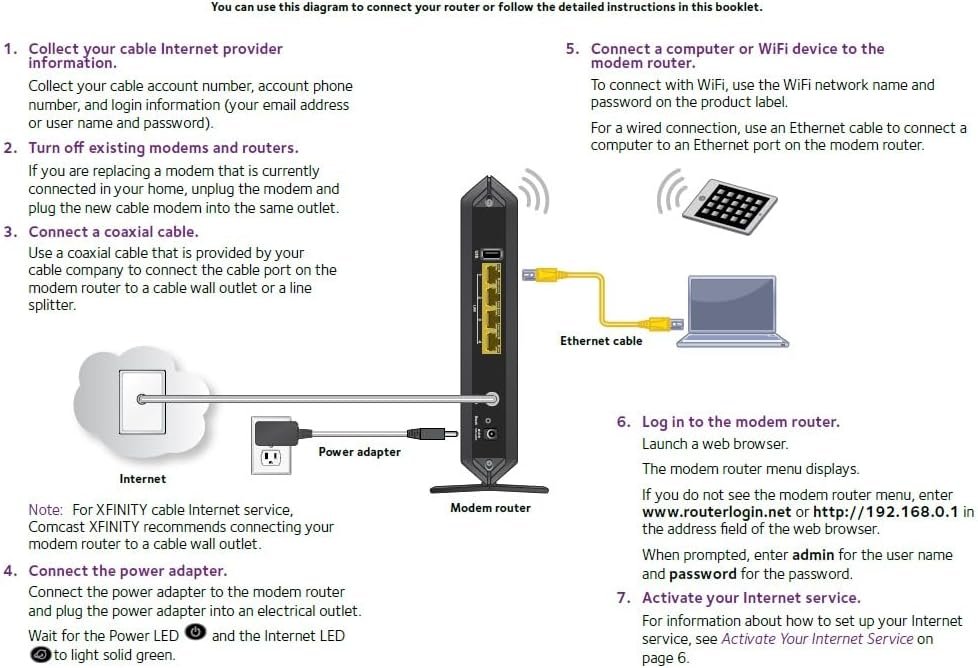
Three-in-one DOCSIS 3.0 Cable Modem + AC1900 WiFi Router+ 4 Gigabit Wired Switch
COMPATIBLE WITH ALL MAJOR CABLE INTERNET PROVIDERS: Including certification by Xfinity by Comcast, COX, and Spectrum. NOT compatible with Verizon, AT&T, CenturyLink, DSL providers, DirecTV, DISH. NOT compatible with Cable bundled voice services
Input voltage:120 -240V
SAVE MONTHLY RENTAL FEES: Model C7000 replaces your cable modem and WiFi router saving you up to $150/yr in equipment rental fees. System Requirements Cable broadband Internet service, Check your cable Internet service provider web site for data speed tier compatibility, Not compatible with Cable bundled voice services.
BUILT FOR FAST SPEED: Best for cable provider plans up to 800Mbps speed
FAST Wi Fi PERFORMANCE: Get up to 1800 sq ft wireless coverage and 30 devices connected with AC1900 speed (up to 1900 Mbps)
VERSATILE CONNECTIONS: 4 Gigabit Ethernet ports give you fast wired connections to your computer, printer, game box and other devices. One USB port for storage devices.
MODEM TECHNOLOGY: Engineered with 24×8 channel bonding and DOCSIS 3.0
SAFE & SECURE: WEP and WPA/WPA2 wireless security protocols
7 reviews for NETGEAR Nighthawk AC1900 (24×8) DOCSIS 3.0 WiFi Cable Modem Router Combo (C7000) for Xfinity from Comcast, Spectrum, Cox, more (Renewed)
Add a review

$99.50
Doug Holland –
Replacement modem/router
Works great. Would recommend installing app on your phone for product update. Last Netgear router used for 10 years needed updating for sure. Netgear makes great modem/routers and easy to understand directions.
Vicki Gesmundo Marcinek –
Easy set up
Easy set up, reliable and good signal strength.
Jayanta –
WiFi range is jaw dropping!
I bought this renewed product on Amazon for $119 and got extended 2 years warranty for $30 from Netgear. So total price was $149 in all. A brand new one comes for $189 with the same warranty. So I saved $40 that I can use for a good takeout dinner!Setup was a breeze and took 10 minutes tops. Xfinity has made it very easy indeed. Comcast rented gateway was good (brand Arris) and the technical metrics on paper (such as upstream/downstream channel, WiFi speed, docsis version) on that one similar to Netgear C7000.However the C7000 blew me away with its WiFi range. My Comcast one would become spotty in my garage (2500 sq feet single family colonial house). This C7000 one works neatly from my neighbor’s entrance and I have a 120 feet long driveway. I have a 1.47 acre plot and I could make WiFi calls to folks inside the house from anywhere on the plot.My comcast one was giving WiFi drops 4/5 times a day on weekdays when many people are wfh. This one had no issues on first business day at work so far. So we will have to see how it performs over time and I will update this review if I see any problem.I called Netgear tech support to ask about additional warranty (they only sent me offers on email as soon as I registered the device) and my experience on that was very positive too. I will know more if I needed actual hardware/firmware help.So, if things don’t turn ugly, I should be saving the modem rental money after my 11th month and I anyway have full hardware warranty for 2 years.I have a 100 mbps xfinity internet package and have multiple WiFi devices (3laptops, 3phones, Roku, chromecast, home security, monitor camera, smart thermostats, smart plug, echo devices, guest phones/tabs at times, etc.) and haven’t seen WiFi drops on any yet and surfing speed is quite good too. This device supports only up to 400 mbps for Comcast – so always check that. If you are big time into online gaming then you may invest in a docsis3.1 one or a game oriented router. But this device does a hell of a job for a normal family with varying internet/WiFi needs.
Patryk Lech –
Worked well while it lasted. Dead after 5 months.
The router/modem was easy to set up and initially worked well. Then it started giving me problems (oddly enough, on the last day of the return window! Coincidence?): Internet connectivity became intermittent (over Wi-Fi or Ethernet). The unit would work for a few minutes after a restart, only to fail again. After a couple days of such bad behavior (after I temporarily replaced it with a unit I purchased at BestBuy, in the middle of the pandemic), it worked for another couple months, only to start misbehaving again. I spent an entire day on the phone with Comcast and NETGEAR. Eventually, a representative of NETGEAR concluded the unit was toast.I would advice against getting this refurbished unit. The price may be tempting, but it’s not worth the trouble you may be getting into.Oh, and NETGEAR gives you 90 days of warranty! After that they will charge you a lot of money for a warranty extension ($50/3 mo, $180/yr or $280/2 yrs). And the best they could do was to tell me to perform a factory-reset of the device! Gah!
kam87 –
it works!
I would’ve replaced my rental xfinity wifi modem sooner, but would read mixed reviews on Amazon for wireless modems in general, and just put off investing in my own wifi modem. But the rental cost of the xfinity modem went to $14 a month so that was the final straw and bought the NETGEAR Nighthawk AC1900. I am happy to report that it works perfect, and has a separate 2.4 Ghz and a 5G signal, so its like 2 wifi signals in one.For the less technical types, like myself PLEASE READ. If you have Xfinity, call them and tell them you are switching your modem. You will provide Xfinity with the serial and model number of the modem on the side of the unit. BE AWARE though the signal will be working, you will NOT have access to the internet until you then call Netgear to register the modem with them. As soon as you do this it will be working. You may need to unplug it for 20 seconds for it to reboot.I have 7-8 devices on it, and it works great. No issues with signal drops or latency. Most importantly I’ve gotten my monthly Xfinity bill down to $49 a month and couldn’t happier.
Casey P –
Best investment I’ve made in a while
Signal strength is excellent I have Xfinity prepaid limits me to 50 Mbps after installing this router I did an oogla speed test and the max I achieved was 9:47 I steadily run around 250 MVPs up to maximum 950 but average speed after I upgraded is 250 to 300 Mbps just divide that by 8 and that’s how many megabytes a second. 823 gig game took me 11 minutes to download whereas with my old Xfinity router it would take 9 or 10 hours. So essentially I’m paying $45 a month for the prepaid which limits me at 50 but with the Nighthawk it I guess if bypasses the throttling bandwidth from the old Xfinity router or something because I’m getting anywhere from 5 to 8 or 9 times the speed I was previously getting and all for 45 bucks. Pretty much Plug and Play excellent quality compatibility was not an issue and the sizes relatively slender, it stands straight up
christopher kinneman –
Great product. if your looking for a Go to router. for Xfinity comcast
I wanted to change my router from xfinity to this one my friend Willam gave me a hella recommendation!! I’m happy with this router it was quick and easy to setup. I did not even have to change my information at all I also downloaded the net gear APP and I’m impressed with it I love your routers hell I would review as many as I could if I had the money! Thank you net gear for the best Router!