

Redragon K580 VATA RGB LED Backlit Mechanical Gaming Keyboard with Macro Keys & Dedicated Media Controls, Hot-Swappable Socket, Onboard Macro Recording (Blue Switches)
$54.99
Related Products


Product description
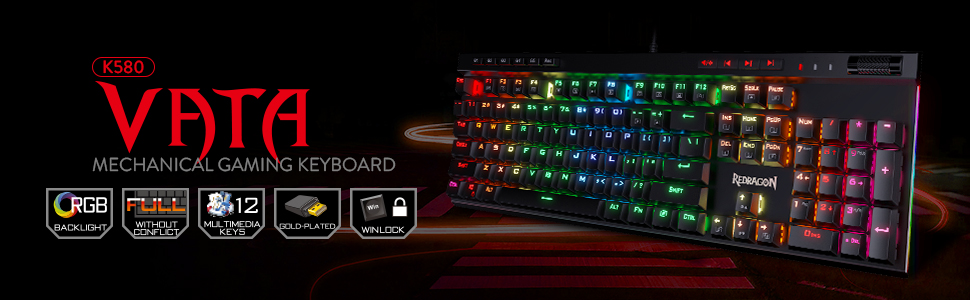
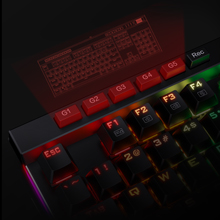
Onboard Macro Keys
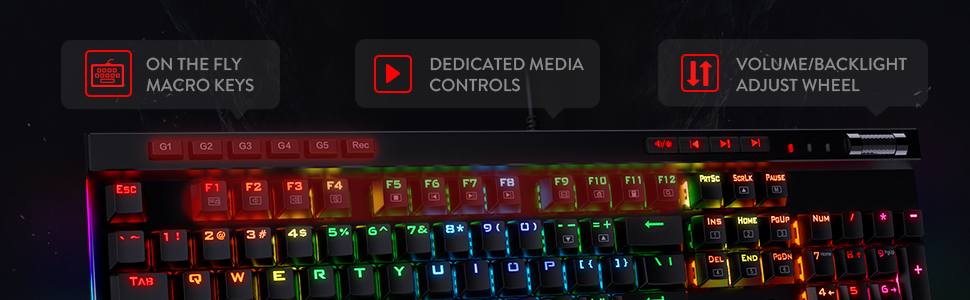
5 programmable macro keys (G1-G5) on the keyboard allow recording macros on the fly without any additional software required to be installed.
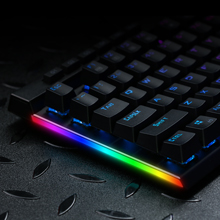
RGB Side Lights
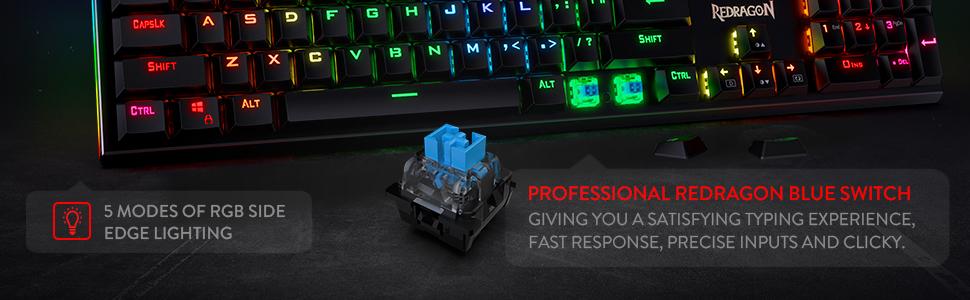
In addition to the 18 RGB modes for the main keys, there are 5 modes of RGB side edge lighting. Angled down and to the side, they will dazzle up your desktop!

Dedicated Media Controls
The controls let you quickly play, pause, and skip the music right from the keyboard without interrupting your game. Scroll bar allows intuitive control with simple motion.

RGB Backlight DIY
The color of each key lighting on the keyboard can be customized easily without installing software, a great choice to DIY your stylish keyboard.
Add to Cart
Add to Cart
Customer Reviews
4.5 out of 5 stars 5,524
4.1 out of 5 stars 2,320
4.6 out of 5 stars 6,927
4.6 out of 5 stars 1,540
4.4 out of 5 stars 555
4.6 out of 5 stars 684
Price
$54.99$54.99 $42.74$42.74 $29.99$29.99 $49.99$49.99 $59.99$59.99 $52.99$52.99
Dimension/size
17.3×6.0 in 17.2×5.8 in 11.5×3.9 in 13.1 x 5.4 in 13.9×4.1 in 15.3 x 5.5 in
Keyboard Weight
0.97 kg 0.72 kg 0.43 kg 0.95 kg 0.51 kg 0.92 kg
Switch Type
Blue Switch Red Switch (Low profile) Red Switch Red Switch Red Switch (Hot-Swap) Custom Switch (Litsea)
Keys
104 104 61 81 78 98
Connection
Wired Wired/BT/2.4Ghz Wired Wired/BT/2.4Ghz Wired/BT/2.4Ghz Wired/BT/2.4Ghz
Extra G Keys
5 5 0 0 0 0
RGB Backlit
✓
✓
✓
✓
✓
✓
Software
✓
✓
✓
✓
✓
✓
5 Macro Keys – There are 5 programmable macro keys(G1~G5) on the keyboard which can be recorded macros on the fly without any additional software required to be installed. Easy to edit and DIY your stylish keyboard.
Dedicated Multimedia Controls – The multimedia controls let you quickly play, pause, skip the music right from the keyboard without interrupting your game. Also, designed with a volume/backlight adjust wheel, it’s easy to adjust volume or backlight brightness directly with the wheel in the upper right side of the keyboard. Very convenient and cool looking.
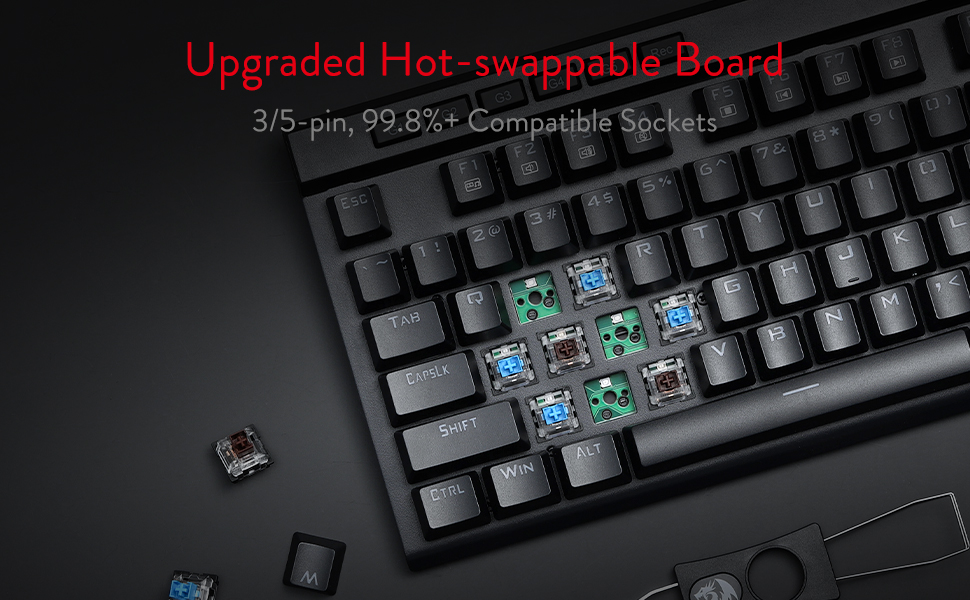
Upgraded Hot-Swap – The brand new upgrade with nearly all switches(3/5 pins) compatible, the free-mod hot-swappable socket is available now. The exclusive next-level socket makes the switch mounting easier and more stable than ever.
Durability – 50 million times keystroke test, 60g actuation force, and 2.3 mm short travel. Special Double-shot injection molded keycaps never fade key font with waterproof and dust resistant mechanical switch.
RGB Backlight – 18 backlight models allow you to type in the dark. You can adjust its brightness with a control wheel or FN + Up/Down. 5 modes of RGB side edge lighting. The color of each key lighting on the keyboard can be customized easily without installing software, a great choice to DIY your stylish keyboard.
8 reviews for Redragon K580 VATA RGB LED Backlit Mechanical Gaming Keyboard with Macro Keys & Dedicated Media Controls, Hot-Swappable Socket, Onboard Macro Recording (Blue Switches)
Add a review

$54.99
rcvc –
Great value, has all I want
Nice keyboard. Has all the features needed. Wireless or wired. Nice font on the keys that has good RGB passthru and there isn’t too much RGB color bleed between the keys. Volume wheel is always a must for me and this one is metal with a nice click feel to it. You can also change the function of the wheel to change brightness etc. I installed the software and it works well but almost everything can be controlled without software via keyboard inputs. Once you configure the software, your choices can be saved to the board and you can remove the software if you choose. You can easily change the keycaps and switches but I’m liking these pretty well so far. Red linear, good sound and actuation is just perfect for me so far.
BDE –
One of the absolute BEST at any price
I recently bought an un-godly number of keyboards, looking for an upgrade or change from my well loved Corsair K70 Lux RGB with brown switches. I opted for the newer K70 Pro with optical linear switches as my new daily. Those switches are amazing and the keyboard is solid and sexy!The Red Dragon K580 VATA RGB is just as good and better is some aspects. First, the build quality is top notch. The blue switches are nice and satisfying if you like tactile and clicky. The layout is basically perfect for a full board with macro keys on top left and media controls on the top right. The volume wheel has become a mandatory feature for me, and this one is smooth and solid.The one feature that this board has that beats out the Corsair: Programmable RGB WITHOUT SOFTWARE! I run Linux on all of my machines and obviously none of the mainstream brands offer their software for Linux, and even if they did, I wouldn’t want that bloated spyware laden garbage anyway. Red Dragon has managed to offer a HUGE range of custom lighting options that you can pretty easily achieve with just the function key.The other feature that I am enjoying is the programmable macro keys. It’s not a deal breaker to not have them but it’s pretty sweet for saving time and keystrokes.For the price, and even for twice the price, I’m not sure you can do better than this board. I did try the red switches as well and they were actually even better than the blues (for my taste). Personally, if I chose this keyboard for my daily, I would choose the red switches. Either way, it’s a matter of taste and you can’t go wrong on this one.One last note, I also tried the K622 Horus TKL RGB and it was also great but I felt the media switches were just a little lower quality. That’s not a huge deal as those are rarely used and if you want TKL layout, that keyboard is also incredible overall.
Steve F. –
Nice Mechanical Blue Switch Keyboard with RGB (Per Key) Lighting
Oct 2021 Edit:Over a year later (purchased this in May of 2020). The LED lights started dimming out like crazy about a month ago. The E, S, Z, I and O are the only letter keys still fully lit (all the none letter keys are still fine!). I’m leaving this at a 5-star rating because this has lasted vastly longer than the Corsair board that this replaced and for a “budget” keyboard to way outdo one of the big boys on the block is absolutely amazing to me!Original review:This review is for the Redragon K580 VATA Keyboard.I’m a moderate gamer and I work from home, in a “call center” environment. So I needed a keyboard that could take heavy use. Logitech and Corsair have both failed me in recent years, so after a bit (I.E. hours and hours, leading into weeks!) of video reviews, I figured I’d give this “off brand” a try, since the big names are now just resting on their names and churning out crap products at insane prices.The Road to this keyboard:For years I have trusted Logitech as my go to company for computer peripherals. However, their gaming line up in mechanical switch types leaves a LOT to be desired, so I tried the Corsair K95 RGB Platinum (purchase date July 30, 2019 https://www.amazon.com/CORSAIR-PLATINUM-Mechanical-Gaming-Keyboard/dp/B01MS0I1ZK). Within days of receiving that keyboard the light behind the “C” key started to dim as time went on other keys started to dim, some going almost completely out. Since this was a gift from one of my daughters I kept using the board and trying all the “fixes” Corsair jokingly has on their forums. None have worked, and not even a year later I’m hunting for a replacement to a $200 “premium” keyboard.I needed one that I could replace parts on it (just in case, since I’m not a DIY, fan but will DIY if need be). Dedicated volume rocker, per key lighting, software to allow me to set the lights for working vs gaming (clean one color for working). These requirements alone knocked all the big names out of the running. This lead to two keyboards, the TECWARE Spectre Pro Keyboard (sadly not available in the USA yet) and this one. Both had what I was looking for, but the Spectre Pro is more stylish and has a detachable cable, but since it is not available here, the Redragon VATA won.The Review:I’m not much for the unboxing thing, but ya, it came in a box and I took it out of said box. It has extra switches, a key puller and switch puller too. It has survived a month of gaming and working so far. Games include Rust, Conan Exiles and Rocket League to name a few. Working includes at least 10 8 hours sifts of non-stop calls and typing in customer responses, queries, fixes, etc. The rest of the month were normal shifts of mainly 10 calls per hour. This keyboard shows zero signs of wear yet and I have come to trust it!Pros:* Sturdy with almost zero key wiggle.* Lighting is more than bright enough to see colors in full sunlight.* Volume rocker has tactile response when turning it so one can feel how many “clicks” (bumps?) they are going up or down.* Heavy enough to stay in place (on large mouse/keyboard pad), with zero sliding.* Full size, but small footprint (no extra crap added for the hell of it, wasting space!)Pro/Cons:* No USB pass through. I see this as a pro since I have 3.0 USB hubs to handle other peripherals, but some people are still stuck in the last decade I guess and might see this as a con.Cons:* Attached cord.* Metal “twang” sound when bottoming out the keys. After the first night of use I don’t notice it anymore, unless I try to hear it.In conclusion, I’d say so far so good and have already started looking at Redragon first for other items I might need (Free hint: Wireless headsets would be a nice addition to your line up!).
Burak Özdemir –
Fiyat performans ürünü, parasının karşılığını veriyor. Sadece eksi olabileceğini düşündüğüm tek konu her tuş basımı ardından gövdeden bir çınlama sesi geliyor, onun haricinde içinde kullanılan mavi anahtarlar, oldukça kaliteli ve hoş bir klik sesine sahip.
Kiki –
Amazing quality gonna have to see how it holds up but it’s really good premium material too great feeling when pressingI’m not gonna look at big brands no more
Diego –
Es un teclado muy funcional y estéticamente bonito. Lo uso para jugar mayormente y cumple. Por el precio me parece bastante bien. Un poco ruidoso y trae switches de repuesto o para personalizar
RIRIO –
HyperX Alloy Originsを買ってすぐにwキーが途切れる様になり(致命的)買い替えました。公式ソフトウェアの情報が分からず、ホットキーだけでもマクロが使えてパスワード入力等楽でいいと思っていましたが、全キー複雑なマクロにすることが出来ます。ライトは内臓されたものや個別に好きな色等も可能。マクロ編集もライトアップ変更も、正直HyperXより使いやすい・・発色も綺麗 ホットキーは手元でRECするのみでディレイは勝手に50ms位になります!
Manu –
Llevo ya varios meses usándolo y va siendo hora de plasmar mis impresiones.En cuanto a la fabricación y acabados, sobresalientes. Buenos materiales, teclas que da gusto pulsar (con su característico sonido), y robustez en el montaje.La conexión inalámbrica no tiene lag, la pulsación se corresponde de manera inmediata con el resultado en pantalla, probado a nivel usuario y en juegos online, tipo LOL (prefiero jugar con mando y soy poco asiduo a este estilo de juegos) no hay ningún retraso, o si lo hay es mínimo, entre pulsar las teclas de dirección o de acción y la respuesta en pantalla.El software propio para controlar la iluminación juega con todas las posibilidades: desde el tipo de iluminación, los colores, o la intensidad de la misma, hasta controlar el tiempo de apagado, algo que yo considero fundamental, ya que la gran mayoría de teclados gaming traen un tiempo de apagado por defecto que, normalmente, no suele ser de más de 1 o 2 minutos, y más si es en teclados inalámbricos, para ahorrar batería. Aquí se lo configuras tú.Punto negativo? La batería. Si no apagas el interruptor del teclado, se consume relativamente rápido. Yo le doy un uso intensivo y aguanta un par de días SIN apagar el interruptor, que no está mal, pero ahí sí flojea comparado con otros inalámbricos gaming que he tenido.La carga es aceptable, no se demora demasiado, aunque no he controlado el tiempo que tarda.Y para consultar cuánto le queda de batería, basta con pulsar dos teclas, y se iluminarán del 1 al 0 para indicarnos a cuánto está. Eso sí, una vez que baja del 7, cae en picado.El resto: teclas programables, control de volumen con un rodillo, gomas antideslizantes y elevadores, son todos puntos positivos.Dicho esto, por el precio que tiene, sabiendo que teclados similares pueden costar entre los 100 y los 200 euros, lo recomiendo totalmente.