

TP-Link Ultra-Portable Wi-Fi 6 AX1500 Travel Router TL-WR1502X | Easy Public WiFi Sharing | Hotel/RV/Travel Approved | Phone WiFi Tether | USB C Powered | Multi-Mode | Tether App | Durable Design
$5.99
Related Products
![[2-Pack] USB C Wall Charger,50W 5-Port PD Fast USB C Charging Block,2USB C+3USB A Multiport Plug,Type C Power Adapter Brick Cube for iPhone 17/16/15/14/13/12/Pro Max/XS,iPad,for Switch,Samsung,Ultra 2](https://simplytechco.com/wp-content/uploads/2025/11/71wfX0AdoL._AC_SL1500_.jpg)



Powerful Wi-Fi in Your Pocket
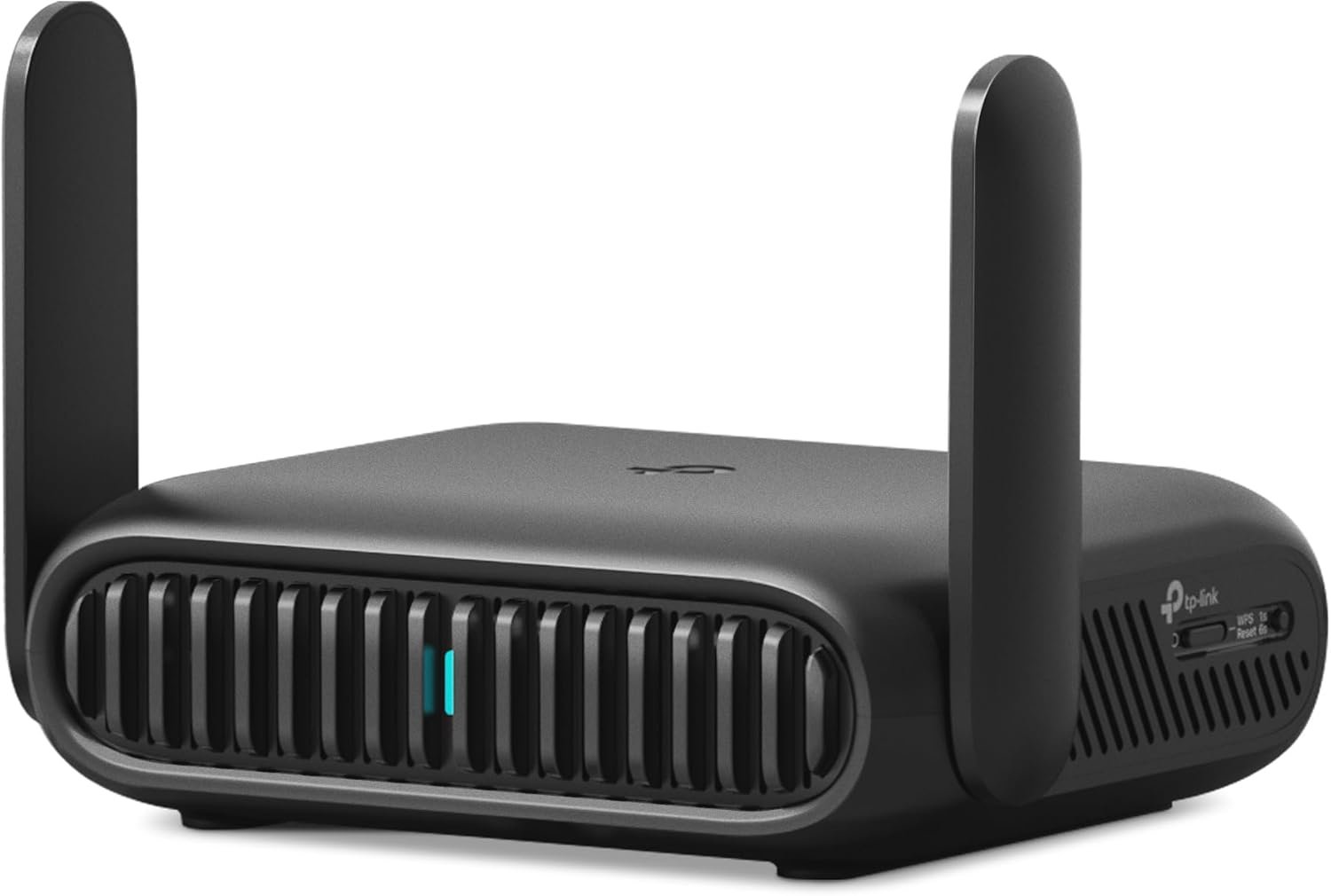
TL-WR1502X is our first Wi-Fi 6 travel router. With the latest Wi-Fi 6 technology, you can enjoy more capacity for connected devices and faster wireless speed on the road or at home. Equipped with a powerful CPU, two gigabit ports, one USB 2.0 port and Type-C powersupply, TL-WR1502X is designed to be an efficiently compact device. It’s an ideal solution for the faster data rates and external storage.
𝐀𝐗𝟏𝟓𝟎𝟎 𝐃𝐮𝐚𝐥-𝐁𝐚𝐧𝐝 𝐖𝐢-𝐅𝐢 𝟔 𝐓𝐫𝐚𝐯𝐞𝐥 𝐑𝐨𝐮𝐭𝐞𝐫 – TL-WR1502X delivers fast wireless speed (1201 Mbps on 5 GHz, 300 Mbps on 2.4 GHz) for uninterrupted video streaming, downloading, and online gaming all at the same time.
𝐏𝐨𝐫𝐭𝐚𝐛𝐥𝐞 𝐚𝐧𝐝 𝐃𝐮𝐫𝐚𝐛𝐥𝐞 𝐃𝐞𝐬𝐢𝐠𝐧 – The TL-WR1502X, measuring a compact 4.09 in. × 3.54 in. × 1.10 in., is a pocket-sized travel router perfect for your next trip or adventure. With no moving parts, it’s built for long-lasting portability. Its small size ensures easy, travel-friendly storage.
𝐄𝐧𝐣𝐨𝐲 𝐑𝐞𝐥𝐢𝐚𝐛𝐥𝐞 𝐍𝐞𝐭𝐰𝐨𝐫𝐤 𝐀𝐧𝐲𝐰𝐡𝐞𝐫𝐞 – Supporting multiple modes (Router/Access Point/Range Extender/Hotspot/Client/3 4G Modem Mode), TL-WR1502X allows you to create Wi-Fi in various scenarios: at home, hotel rooms, cafes, RVs or on the road. (Is not a Mi-Fi device. Requires 3G/4G USB modem)
𝐄𝐚𝐬𝐲 𝐅𝐢𝐥𝐞 𝐚𝐧𝐝 𝐈𝐧𝐭𝐞𝐫𝐧𝐞𝐭 𝐒𝐡𝐚𝐫𝐢𝐧𝐠 – By plugging an external USB hard disc into the router, you can easily share files between connected devices. By USB tethering, its easy share your phone’s data traffic with your other devices to access the Internet.
𝐏𝐨𝐰𝐞𝐫 𝐈𝐭 𝐰𝐢𝐭𝐡 𝐚 𝐏𝐨𝐰𝐞𝐫 𝐁𝐚𝐧𝐤 – With a Type-C interface, you can flexibly turn it into a mobile router with a 9V/12V PD/QC-compatible power bank (sold separately).⁴
𝐂𝐚𝐩𝐭𝐢𝐯𝐞 𝐏𝐨𝐫𝐭𝐚𝐥 𝐀𝐮𝐭𝐡𝐞𝐧𝐭𝐢𝐜𝐚𝐭𝐢𝐨𝐧 𝐢𝐧 𝐎𝐧𝐞 𝐒𝐢𝐧𝐠𝐥𝐞 𝐒𝐭𝐞𝐩 – Turn the public network into your private secure network via the tether app. In just one simple step, effortlessly complete the captive portal authentication during router configuration process, freeing you from the hassle of authentication on each one of your devices.
𝐄𝐚𝐬𝐲 𝐒𝐞𝐭𝐮𝐩 𝐚𝐧𝐝 𝐌𝐚𝐧𝐚𝐠𝐞𝐦𝐞𝐧𝐭 – Set up and manage your router in minutes with the free Tether App available for both Android and iOS devices.
𝐏𝐥𝐞𝐚𝐬𝐞 𝐧𝐨𝐭𝐞 𝐭𝐡𝐢𝐬 𝐦𝐨𝐝𝐞𝐥 𝐝𝐨𝐞𝐬 𝐧𝐨𝐭 𝐬𝐮𝐩𝐩𝐨𝐫𝐭 𝐎𝐩𝐞𝐧𝐰𝐫𝐭
8 reviews for TP-Link Ultra-Portable Wi-Fi 6 AX1500 Travel Router TL-WR1502X | Easy Public WiFi Sharing | Hotel/RV/Travel Approved | Phone WiFi Tether | USB C Powered | Multi-Mode | Tether App | Durable Design
Add a review

$5.99
Res –
Handy little gadget
I bought this to use while at a program with multiple “modes” of wifi available to me that I could test with. This little router is nice for the price, and as I have TP-Link’s higher end routers at home with mesh wifi at my house, I figured this would be good since it would have a similar interface and features. It turns out that it has some interesting features but also some quirks. OOTB, the firmware needed an update which was painless. I don’t like using the phone app for configuration, but it is handy. The web interface is functional and responsive, although I don’t like how the pages load templates and then fill in the “settings” after the page loads. The “Internet” page in the web interface has a password field for networks with passwords, but it is plain text so passwords aren’t hidden, even if you refresh the page for instance.Wifi tethering was the reason I bought this router. When you look at available networks, it doesn’t just show available SSIDs, but lists explicitly the available SSIDs, network frequency, and MAC address. There is a lock feature, so networks with multiple APs can be explicitly connected to. In early wifi systems where the mesh standard wasn’t implemented yet, this alleviates issues where some devices don’t connect to APs properly. You can also specify a specific band to connect to. In the building I’m in, the wifi system has a problem on the 5GHz band, so I can lock the connection to a specific 2.4GHz AP with the right mac address and although the connection is a bit slow, it functions. There was no possible way for me to get wifi on a 3 year old laptop by changing the wifi hardware settings in the driver, which seems odd. A bit of a fluke for Windows? Anyway, there are other reasons to carry a travel router.The VPN function was a breeze to setup. I linked the router to my VPS and had Wireguard running easily. Turns out that unlike my home system, this router allows you to toggle specific devices to use the VPN. There is also a server option which could be handy if you have multiple routers and want to link networks without running a separate machine.I tested the guest network with some friends and it works great. Able to specify bands and have both guest and primary network on both 2.4GHz and 5GHz simultaneously unlike my Orbic hotspot. The guest network does not allow access to the web interface for configuration.Number of devices appears to be significant… You can specify subnet mask and DHCP server settings. By default you get 254 devices, which should be enough.DNS can be overridden for wifi tethering, including using DoT and DoH encrypted DNS without requiring a separate forwarding agent for systems that don’t support encrypted DNS. The only disadvantage to messing with DNS is that on some networks, you may run into issues connecting to networks if they use web based login pages that can’t be accessed when DNS is overridden, so be careful with that. I was able to setup my router to connect to NextDNS with DoH but not DoT. DoT wouldn’t work for some reason; the server was detected but NextDNS reported that it wasn’t using a profile. This wasn’t the case with DoH. One feature request I have would be the ability to have advanced DNS configuration settings by device or at least by network, so the guest network could use a different DNS configuration or perhaps the default DNS from the wifi.The last feature I like about the router is QoS. My Verizon Orbic has a very high speed connection before I use up my data when I have a decent signal, however sometimes QoS is a good feature to have to ensure you don’t abuse your own data caps if you’re going to be out a while and need to conserve data. It’s also useful if you’re sharing a hotspot through a travel router without QoS like the Orbic, and want to make sure nobody uses all the data.NAT can be disabled, which might be interesting to try with the VPN feature.The MAC address of the wifi tether connection is completely changeable, and with the web interface can autodetect the devices’ MAC address you login from and clone it. This is useful for instance, if you pay for wifi access from another device but later want to tether that wifi through the router without paying again or signing in again.I haven’t tested router mode, usb mode or any of the others. Router mode would actually be useful from the Verizon Orbic or a hotspot with an ethernet port on it with the IP passthrough mode enabled and a short ethernet cable to cut down on wifi interference.The biggest most major quirk the AX1502 has is the 12volt USB-C power. I bought a USB battery, but with the router connected while my laptop is, it slows down the laptop charge rate. Same with my wall adapter. Both of these are Anker chargers. The next model up of this travel router supports USB-C 5V, but it’s 3A which is also not really great for standard adapters. Don’t lose the stock power adapter, which ironically enough is a 12volt USB A plug! I hope it’s safe. The router itself literally draws about 3 watts of power max, so it’s probably fine to get another small battery for it if I need, but I’d rather not have to carry yet another thing in my bag of tricks.Wifi range is decent, but obviously don’t expect miracles. There are no external antenna connectors or even antennas. Literally just plugin and go. Works best for short range applications, but the signal will go through a wall or two.Performance is decent, but not my main consideration with this router. Most hotspots are not fast or even reliable to begin with so when tethering it’s not really a consideration. VPN performance was identical to running Wireguard software on my laptop, which is a plus. One quirk is, IPv6 is not supported for Wireguard clients on the router. Why this is the case makes sense, but I don’t have faith that this travel router is really IPv6 compatible to begin with.Size is fine, just feels a bit plasticy and cheap. Hopefully the chassis won’t break.
Blake –
Great features at a great price for a home server user
Excellent little device for a home server setup. Created a wireguard server on this router through TP-links software. Super easy and even gave me a QR code to scan to add my phone to the VPN. So that I can access my home network anywhere through my phone! Redirected all DNS queries to pihole on my NAS. Setup a No SSID broadcast for my IoT devices that do not support WPA3. All other devices receive excellent signal(2.5 and 5GHz) even across the house through at least 4 walls. Blows my new ATT router out of the water for features and overall range.Initially I wanted something more feature rich that allowed me more control over my home network. This has provided me exactly what I was wanting for a great price! Now if I ever move, I don’t have to reconfigure anything.My only gripe would be the pop up that comes up every time I login to the router. Once I sent all DNS through Pihole with VERY strict denials. The pop up vanished.
SiskiyouScoj –
Very solid for the price
At the end of last year, I’d picked up my first dual-band router—WiFi5/AX1500 (not one of the top three brands, but a good one nonetheless). Whether I wanted them to or not, my provider (Spectrum) increased internet speeds and upgraded my modem, and that router wasn’t keeping up with things. I’d kept my eyes open for a quicker, more current router, and this one was on sale for about $55.I have used TP-Link routers before and find them very reliable. Since the modem is 1GB, I wanted something more compatible and, also, I pay for 4K on one of my premium streaming services, and my speed and bandwidth with the AX1500 wasn’t offering me that quality.Because I’ve used TP-Link (and was currently using a TP-Link extender), I already had the Tether app on my phone and tablet. That made it very easy to set up this router. Note that this Archer AX-10 dual-band router can either use Smart Connect to choose between 2.4 and 5 Ghz bands or you can set them up separately. I prefer separate, especially since I have something like six smart outlets and eight smart lightbulbs configured, and the outlets and bulbs were pretty finicky with my older router.I have to say that the range on this is very good. My home is about 2400 sf; 1800 upstairs and a large studio room downstairs. I’ve learned to keep my router high up on a piece of furniture, and so the signal makes it through the house pretty well. (Signal strength decreases in the farthest room. And, as you probably know, 2.4 travels farther than 5 Ghz.) But the range, speed, strength, and stability of this router exceeds my previous one. When watching certain streaming channels, they would lag or freeze using 2.4 in more distant rooms, but I haven’t found that to be the case with this. The signal is very solid.That said, I am a little disappointed in the speeds, but maybe this is what they’re supposed to be as the router is handling many devices. And I haven’t taken the time yet to call Spectrum to find out what the story is. This is at least twice as fast as my previous router. While the Tether app was very useful for the initial setup, more advanced settings are available on their website, which Tether leads you to. That, for instance, gave me the option to update the router’s firmware, which, on my setup, did increase speeds a bit. While my A1500 was giving me only 13 Mbps on my farthest 2.4 Ghz Roku, this has increased that to 31 Mbps but also given that stream much more stability. My 5 Ghz speeds went from 91 to ~220–240 Mbps on a Roku and my 4K Smart Fire TV, which are about six feet away from the router. (I learned that the Fire-TV’s ethernet port is limited to about 100 Mbps.) Speed tests for my laptop and desktop Macs show about 450 download (more than four times AX1500 WiFi5 modem) and 22 Mbps upload (which, I assume, my provider is limiting).I had questions about the direct-connect speed with the smart tv, and posted a query in the manufacturer’s user forum, and they answered and solved the problem within a few hours.I thought I was very clever naming both 5 and 2.4 bands the same as the previous modem with the same passwords, but yet, I had to relink everything—every smart bulb, every smart outlet, every device (the devices and computers needed me to enter passwords again). That took a while.I’ve read this is not the latest update of WiFi 6. It’s a little beyond my technical expertise but reviews say it doesn’t support 160MHz channel width or WPA3 encryption, and it lacks USB ports. I don’t need USB ports and the other “deficiencies” (such that they are) don’t bother me. For the price I purchased this at, it’s certainly improved my internet speeds and stability. I do need to call my provider and see exactly what speeds I should be expecting, but this router seems fast, reliable, and strong.
Mahmoud S. –
As described
I. suwandi –
Setup is a breeze. No problem. I use the Tether app. You can also connect LAN cable from PC to this Router and type 192.168.1.0 whatever and set the router the old way. Run within 5 minutes and show strong wifi signal everywhere in our condo. I leave Tech support rating blank since I do not call or attempt to cal! them. Amazon should dispense with this evaluation since not all buyer need help. Overall: Highly recommended – excellent value for money
abohusam –
الراوتر ممتاز جدا حل مشكلة التقطيع التي كنت اعاني منها وكذلك المدى يصل إلى جميع الغرف كل ذلك بسعر رائع
Gonzalo Villanueva –
Excelente producto, lo adquirí por que comencé a tener problemas con mi mi compañía (Axtel) ya que la calidad de sus módem deja mucho que desear y a pesar de que iba a la velocidad contratada por medio de cable, por wifi no me daba ni 1/5 de la misma. Con este router se soluciono el problema, la conexión es muuucho mas estable y con el logro las velocidades de subida y bajada simétricas contratadas incluso a través de WiFi.
Alex Ali –
It’s a very nice router it’s work fine I like it very much