

Lutron Caseta Original Smart Dimmer Switch Kit, 2 Dimmer Switches, 2 Wall Plates, 2 Pico Remotes, and Smart Hub, Works with Alexa, Apple Home, Google Home, 3 Way, 150W, No Neutral, P-BDG-PKG2W-A
$25.99
Related Products






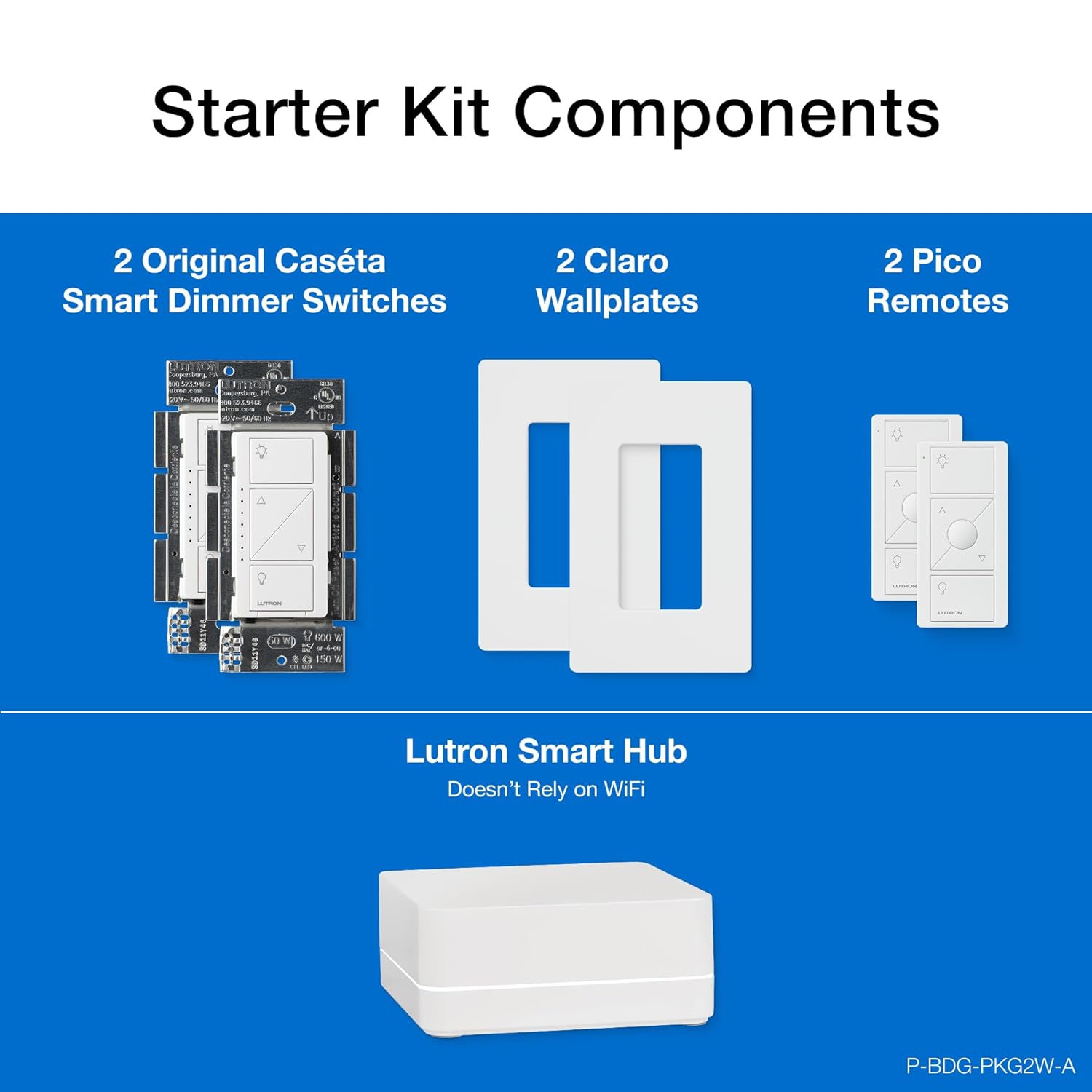


The Caseta Deluxe Dimmer Kit with Caseta Smart Hub provides simple and personalized control of your lights, shades, and temperature, ideal for energy efficiency and customizable ambiance. Control your lights from anywhere within your home with the included Pico remote controls or from anywhere in the world using the free Lutron app. Set lights to automatically adjust with spring and fall time changes, create personalized schedules to turn on, off, or dim lights at set times to best fit your everyday routines, or control lights with your voice via Alexa and Siri. The Caseta Smart Hub also connects with other leading brands like Ring, Honeywell, Sonos, Serena shades, and more. The included in-wall dimmers install easily with no neutral wire required, providing optimal dimming performance for over 500 different dimmable LED bulbs and can be controlled from anywhere within the home with the included Pico remotes. To use dimmers in a multi-location application, replace the existing switch with the included Pico remote control and wall plate adapter, sold separately. The Pico remote control takes (1) CR2032 battery, included in remote.
Is Discontinued By Manufacturer : No
Product Dimensions : 1.13 x 2.93 x 4.69 inches; 0.01 ounces
Item model number : P-BDG-PKG2W-A
Date First Available : November 1, 2016
Manufacturer : Lutron
ASIN : B01M3XJUAD
Best Sellers Rank: #7,143 in Tools & Home Improvement (See Top 100 in Tools & Home Improvement) #23 in Dimmer Switches
Customer Reviews: 4.7 4.7 out of 5 stars 5,191 ratings var dpAcrHasRegisteredArcLinkClickAction; P.when(‘A’, ‘ready’).execute(function(A) { if (dpAcrHasRegisteredArcLinkClickAction !== true) { dpAcrHasRegisteredArcLinkClickAction = true; A.declarative( ‘acrLink-click-metrics’, ‘click’, { “allowLinkDefault”: true }, function (event) { if (window.ue) { ue.count(“acrLinkClickCount”, (ue.count(“acrLinkClickCount”) || 0) + 1); } } ); } }); P.when(‘A’, ‘cf’).execute(function(A) { A.declarative(‘acrStarsLink-click-metrics’, ‘click’, { “allowLinkDefault” : true }, function(event){ if(window.ue) { ue.count(“acrStarsLinkWithPopoverClickCount”, (ue.count(“acrStarsLinkWithPopoverClickCount”) || 0) + 1); } }); });
MOST CONNECTED SMART LIGHTING: Add your lights to Amazon Alexa, Apple Home, Google Home, Ring, Sonos, Samsung with the Caseta Smart Hub; Lutron Caseta Dimmer Switch connects with more smart home devices than any other smart lighting control brand
REMOTE CONTROL LIGHTS IN EVERY ROOM: Use the included Pico Remote to wirelessly control up to 10 Caseta devices anywhere in your home without needing a smart hub; works up to 30 feet through walls, 60 feet line of sight, with a 10 year battery life
MAKE YOUR LIGHTS SMART : One Caseta smart dimmer switch can turn multiple lights or fixtures smart, even existing ones. Save money and keep your bulb styles open by putting smart lighting at the switch
CONTROL WITH THE LUTRON APP: Manage your lights anywhere with the Lutron app; control lighting and advanced smart features such as scenes, scheduling, geofencing, smart-away, timers, 3 way smart remote, app control, and more
CASETA DELUXE AESTHETIC: The Caseta deluxe dimmer switch boasts functionality with a sleek, modern aesthetic. The deluxe dimmer switch allows you to turn your lights fully on and off, with additional buttons to raise or lower the light level
RELIABLY SMART CONNECTION: The Caseta smart hub works without Wi-Fi, giving your dimmer light switch super-fast, ultra-reliable smart lighting that works without slowing other Wi-Fi devices down
Includes (1) Lutron Caseta Smart Hub (2) Caseta dimmer switches (2) Pico 3-button dimming remotes and (2) wall plates
ANYONE CAN INSTALL: No neutral required; Can easily be installed in as little as 15 minutes. We provide step-by-step walkthroughs, install videos, 24/7 technical support (1-800-LUTRON1) and more to help you every step of the way
ADD A 2ND SWITCH ANYWHERE: Mount the Pico Remote with the wallmount bracket to add a 2nd “switch” anywhere; Remote wirelessly connects to the dimmer; no cutting holes or running wires; Any Caseta smart product can be paired up to 10 Pico remotes
TECHNICAL DETAILS : Works with up to 150W LED and 600W Incandescent / halogen
9 reviews for Lutron Caseta Original Smart Dimmer Switch Kit, 2 Dimmer Switches, 2 Wall Plates, 2 Pico Remotes, and Smart Hub, Works with Alexa, Apple Home, Google Home, 3 Way, 150W, No Neutral, P-BDG-PKG2W-A
Add a review

$25.99
Andrew Montijo –
Best dimmer switch
Disclosure: I bought this a few years ago from writing of this review.Amazing product! This has been an essential part of my smart home. In the box, they provided screws, wire nuts, instructions, the switch, pico remote, pico remote bracket, and the hub. The instructions were easy to understand for those who may be nervous about electrical, really went into detail about what to do.I used this device as a replacement for a 3-way switch. The installation was fairly simple for that setup. The dimmer switch has two black wires and a green wire, one black wire gets wired to the incoming power and the other wire is connected to the two traveler wires, and ground to ground. On the other side, all three wires are connected together with a wire nut. Screw in the device and the bracket to the wall, the pico remote slides onto the bracket easily. These switches were both part of a two gang box (light and fan), and the faceplate for it fit perfectly over it. The overall look is nice, the dimmer switch has a set up small green lights for the dimmer level… not to noticeable with the light on. One thing I noticed off the bat was that the pico remote has an additional button on it for setting the brightness to 50%, the dimmer switch does not have that button.Setup was simple too. Connected the hub to power and ethernet, downloaded the app, created an account, and it looked for the hub instantly. Found the hub and then started looking for devices. The hub found the dimmer and the pico remote quickly and I had them added to my account. I assigned the room they were in and that was it for setup. I went a step further and linked Lutron to my google home account for voice control. Eventually, I moved to Home Assistant with this Lutron (will connect with Lutron integration or Homekit).As stated before, I bought these a few years back. To this day, they are still functioning the same as when I first installed them. I haven’t noticed any issues with them since buying. I’d say these are very durable for a home. I did purchase a few more to put around the house and setup more automations with them. Very happy with Lutron!
Lee527 –
High quality remote dimmer that just works
Lutron was founded by the inventor of the dimmer switch, and has more experience and a broader range of them than anyone else. These are an easy way to replace a regular switch, or add a new switch anywhere without new wiring. An optional hub (included with some kits) expands its capabilities, but it does all the most common functions even without the hub. I’ve tried dimming several brands of LED light bulbs and it’s worked well, dimmed to low levels, and not flickered with all of them. It also works with many home-automation ecosystems (i use Apple Homekit). Highly recommended.
Frank F –
Reliable Smart Switch by Lutron!
Bought a cheap MOES Smart Switch for our driveway lights about 6 months ago, the connection to the internet keeps dropping and I had to reset almost weekly, sometimes every couple of days. So frustrating until I got a recoomendation from an electrician to buy Lutron Caseta, as he has been installing this brand for a few years and never received complaints! I did and it’s been a great experience, no worries about lights not coming on or off. The old adage: you get what you paid for!
JP –
The “no longer a newbie” take: Lutron’s Hub vs. other Wifi switches
I was once a newbie with Caseta – but no longer, so I hope this helps you. This kit is the first purchase you need for Lutron’s system. Once you have the hub, no more kits are needed for future switch purchases. One hub can manage up to 75 switches (and I think the Hub is included in that count).Some buyers complain about having to wire in Lutron’s hub to your network with an ethernet cable. But you can’t beat the speed and reliability of a wired network connection. Given that Lutron’s product works reliably and is 100% responsive all the time, this is a non-issue for me.Since I put in the first few Casetas, we truly love them and have started to replace switches all over the home. Which brings up another issue… if I had chosen a WiFi connected switches (and I did briefly for use in limited locations, more on that later) I could potentially be adding a much larger number of connected devices onto my network. If your WiFi isn’t all that great to begin with – think entry level routers – this could potentially impact network performance and your connectivity with your switches. For me, that’s just a no go. I really want my WiFi to work well for the things that need to be on it.The PROs of the Lutron Switches:Setting the switches up is straightforward and fast. The setup process works like expected each and every time. I cannot say the same about other non-Lutron WiFi products.Having problems setting them up or is a switch not acting right? Lutron’s support is the bees knees. They have helped me several times and each time they are great.The switches are incredibly responsive both in person and via the app. There are no delays in turning things off and on. The ceiling fan switch is especially a godsend for our old ceiling fan – no more standing on the bed to pull strings or getting up out of bed to adjust things.Lutron and Ring also teamed up and added some camera integrations where movement and/or doorbell pushes can activate lights. It works quite well, but the feature was a little buried in the Lutron app. Big bonus – the integration will also turn off lights after 15 minutes.About the app (and this is a biggie)Purchasing good hardware is one thing, having an app that you only get to experience after you purchase the hardware is downright crazy. But that’s the world that smart switches seem to live in, so here’s the scoop on Lutron – and the apps for a couple other systems I tried.Lutron’s app is well designed and intuitive. You can quickly add new devices, program in schedules and scenes. The app also interfaces with my Lennox thermostat to display the current temp in the home (with the help of Apple’s Home (home kit) app that’s running on a dedicated iPad that never leaves the home). The Ring cam integration is good too.Having tried WeMo and Leviton’s WiFi connected switches, my take on those apps is that they are incredibly clunky. This seems like a misstep, especially when you are going to spend most of your time interfacing with the app than the switch.Since I also use Apple’s Home app with my family, every time a switch gets added into the Lutron hub, it seamlessly shows up in Apple Home. This is of course magically great. Since I didn’t want to add another app into the mix for my wife and family, it’s nice that there have been zero issues with cross platform integration, everything works seamlessly.The Lutron App also has a geofence capability that will turn on/off lights when you arrive and depart from the home. Haven’t used that yet, but it’s cool. Another side benefit, Lutron’s app has an Apple watch app that you can control lights and fans with.The CONS:Edited – The Caseta hub for whatever reason didn’t have auto off timers built in. That said, the addition of their motion sensor product effectively solves this issue.If you have Ring cams, you can turn on the Caseta integration, and a motion or doorbell can turn on lights and after 15 minutes, turn them off again. This works beautifully.Other thoughts:Edited – I used IFTTT (If This Then This) before Ring and Lutron added their cam integration as a trigger to turn on/off lights. IFTTT works, but there was always a bit of a delay to turn on lights if you use it. Plus if you’re internet went down, it didn’t work.Before the Ring integration, I used a couple WeMo switches for my outdoor lighting as they had auto-off timers. But their setup and app was super clunky. Happy to be rid of them.As software support is now kinda important for app driven switches, making sure you get a switch from a company that’s going to be around a while is more important than it used to be. It would be bad if your OS on your phone, requires your apps to get an update and your smart switch maker is MIA.Side note – For the two years I had WeMo switches, changes in Wifi forced me to individually reconnect all switches to it, and it was a horrible process to get them re-paired with WiFi. Lutron has never had this issue, being wired into the network.One switch I purchased from Amazon warehouse (open box) had issues with setup and Lutron’s support was fantastic. They sent a replacement switch so quickly and were really nice about it.Bottom line – stick with Lutron, it works really well.
Daniel –
These dimmers seem to work great. I’ve installed about 7 so far with a few types of regressed ceiling lights and wall sconces and they all dim smoothly.Pros:- Smooth on/off dimming. You can press and hold to change the brightness level, or tap, and it has a lot of levels between 0 and 100% so you don’t get that “skipping” effect some dimmers have.- When the dimmer is off, there is a slight green glow to the brightness level indicator on the left side of the switch. It’s very subtle, doesn’t distract and helps you find it in the dark- Works with every type of light I’ve tested so far. “Dim to warm” ceiling and sconces light on and off smoothly over 1-2 seconds and look great.- Allows for wireless “3 way switches”. This saved me a lot of electrical wiring work when I wanted two switches across an empty room to control the same lights. You can stick the wireless one anywhere, program it quickly and make it blend in with other switches.Cons:- This particular pack only has the round center “scene” button on the wireless switch. This may not be an issue to most, but if you press the regular “on” button, lights automatically go to the brightest setting, not to whatever level you had them at last time. The scene button can turn lights on just to 30% or whatever you set it to. If that’s important to you, go buy the version with a scene button on all switches, wired and wireless.
Ray S. –
Bought 1 unit so that my driveway lights can come on at dusk and off at dawn. Extremely easy to install since it’s one of the few units that does not require a neutral a the box. Very easy to pair with the app. Love the fact that after it’s programmed, it does not require Wifi to function. Plan on buying at least another 4. A bit expensive, but it is a Lutron.
Eduardo –
Me encanto, muy fácil de instalar
Amazon カスタマー –
家中にこのスイッチが設置してる。何年も使ってるけどホームアクセサリーの中で最も信頼性が高いアイテムです。
Mabo –
Cada vez le suben más de precio y con la competencia de focos inteligentes en el mercado cada vez menos justificado. Un gran sistema estable y confiable pero caro