

Netgear Gigabit Cable Modem (32×8) DOCSIS 3.1 | for XFINITY by Comcast, Cox. Compatible with Gig-Speed from Xfinity – CM1000-1AZNAS (Renewed)
$8.99
Related Products



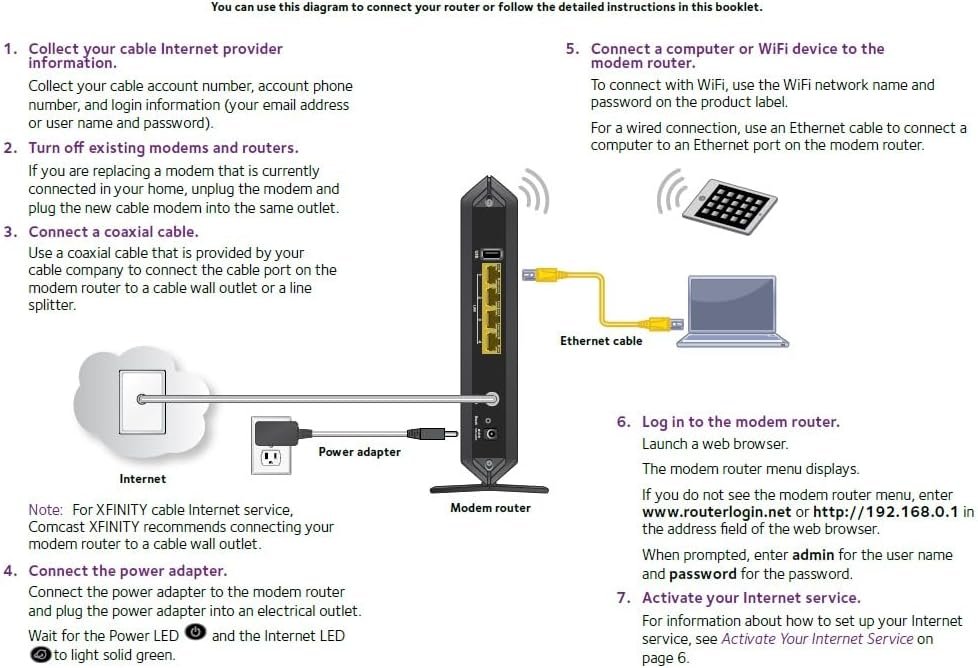


The NETGEAR CM1000 Ultra-High Speed Cable Modem provides a connection to high-speed cable Internet with speeds up to 1 Gbps. It is the industry’s first DOCSIS 3.1 CableLabs Certified cable modem, 10X faster than DOCSIS 3.0. Working with DOCSIS 3.0 and DOCSIS 3.1 cable Internet service providers, it is the ultra-high speed cable modem ready for today’s service plans and future upgrades. Enjoy ultra HD video streaming over IP with 2×2 OFDM or 32×8 channel bonding giving you the fastest download speeds—even during peak hours. Save up to $156 a year* by eliminating Internet service provider rental fees. Ideal for fastest Internet cable services like Comcast XFINITY Gigabit, Extreme and Performance data plans.
Compatible with all major cable internet providers with internet speed up to 1Gbps. Currently certified with Spectrum and Cox (up to 1Gbps), Xfinity (up to 800Mbps). Not compatible with Verizon, AT&T, CenturyLink, DSL providers, DirecTV, DISH and any bundled voice service
Model CM1000 replaces your cable modem saving you up to 168/year in equipment rental fees
Connect any WiFi router to this modem’s Ethernet port to support all your wireless devices
1 Gigabit Ethernet port connects to your computer or separate WiFi router
Made for use in the US only
10 reviews for Netgear Gigabit Cable Modem (32×8) DOCSIS 3.1 | for XFINITY by Comcast, Cox. Compatible with Gig-Speed from Xfinity – CM1000-1AZNAS (Renewed)
Add a review

$8.99
D. Johnson –
Great price.
Easy to install, working great.
T. Wennberg –
Great modem, works well, no complaints.
Works great as a second modem upstairs in a dead spot. No complaints so far. WiFi signal great, speed good.
babnab1 –
SIMPLE SWAP WITH XFINITY
Cable has been acting up for a couple of weeks and I noticed the modem’s light were flashing differently and intermittently. Ordered the modem and it came the SAME DAY!!! I just used the same power cord and Ethernet cable for the new modem. It took all of one minute. Turned it on and waited for all the 4 lights to turn green and the bottom one to turn amber. It took about 20 minutes.It did keep on resetting, but that was expected. Called Xfinity with the new MAC#. They reset everything. I then reset the router and I was back in business. Total time from beginning to end (including waiting on the phone with Xfinity) about an hour and a half. Now I have a good connection and the speed of the internet seems super fast now. The old modem was installed in 2017. I am extremely happy with purchase.
Wormer –
This refurbished is a JOKE
I tried 2 of these. First one I could tell wasn’t working correctly, it powered on but it didn’t go through the back-and-forth with comcast to connect. I couldn’t even see the device by it’s address on my network. Eventually I got through to Comcast and they pushed a connect signal – nothing. Did a factory reset and this time they got a signal to it where it gave the “activation” instructions but they still couldn’t get it to come online.2nd one – definitely different. Did the back-and-forth and all that, but still couldn’t see it on the network. Factory reset and there it was, and I got the Comcast activation message, too. It was gonna’ work……. and after over a half-hour of multiple activation signals, alas, it’s still shows offline at Comcast.There customer support – it’s there a couple hours a day Eastern time – if you’re anywhere else try around 11 – noon your time.Amazon – time to get a new refurbisher – just making sure it’s clean and has parts and powers on isn’t enough, you know darn well I’m going to Best Buy this time.Oh, and just in case you’re wondering if I actually can’t properly plug in and connect a cable – put the old modem back in and 5 mins later I’m writing this review.DO NOT use a device from Kanga. Not just ZERO stars, negative stars. TERRIBLE.
Butchboy –
Has its Ups and Downs
UPDATE after 8 Months—————————-I’ve used this modem for about 8 months so far and for the most part it’s been okay. My only issue is that it drops connection about once a month and will stay that way until I perform a reboot. This started happening a few months ago. To reconnect, I unplug the modem for a minute, then plug it back in. After that, it stays connected for about another month. If this becomes more frequent, I will consider switching to another modem.ORIGINAL Post——————I recently moved and found out, much to my dismay, that Comcast is my only hi-speed internet option. Irefuse to pay them any more that I have to, so buying my own modem was a must. This modem was reasonably priced compared to other brands and met the specs I needed.Installation was easy enough, but came with very little documentation. I am a full time IT engineer, but I think most people should be able to set this up without a problem.Once connected, I tested the speed and it performed well. I have an 800 mhz plan and got speeds exceeding that.My only wish is that it had more than a single ethernet port on the back. I have an Eero mesh router which has to use that port, so I have to plug in my ethernet switch into the Eero mesh instead of directly into the modem. This makes connecting to the modem’s setup screens a bit of a pain.I am very happy with this purchase though.
Amazonshopper56 –
Used refurbished modem
So far it works great.
Travis S. –
Perfect modem for those that like to own their own equipment.
Easy to activate with Xfinity. Log into account go to your equipment and choose to activate/replace. Enter MAC address and within minutes the device is online.During setup if you plug a computer or laptop into the ethernet port to verify connectivity or complete activation, power cycle the modem when switching to your router. It binds the MAC address of the device plugged into the ethernet port until power cycle
Kindle Customer –
Good value depending on longevity
Amazon Renewed product. Did a factory reset on it and then went through the activation process with Xfinity via their mobile app. Activation went flawlessly, and the unit is functioning within design parameters. This is a good value product, depending on longevity.–Don’t forget to log into the modem and change the default password. I found to do this you have to turn the modem off, unhook the coaxial cable (but leave the data cable from the router connected)), and then turn the modem back on. After it completed its start-up I was able to connect to 192.168.100.1 and access the modem log-in page via a browser. Input the default user and password that’s on the bottom of the modem. It will prompt you to change the default.
No –
Mein Netzbetreiber teilte mir mit, dass ich das Gerät an meinem netz nicht zum laufen bringen werde (techniker hat es nicht geschafft). Daraufhin wollte ich das Gerät natürlich zurücksenden – allerdings war das nicht moglich, da ich in den Rücksendeoptionen nur ein ungültiges retourenettiket erhielt.
harburn –
My ISP has a more nuanced choice than the “suitable for Cogeco” It is not good for my area and has to be returned. Not a manufacturers problem.